Raspberry Pi Touchscreen | ||||||||||
| ||||||||||
Product Description
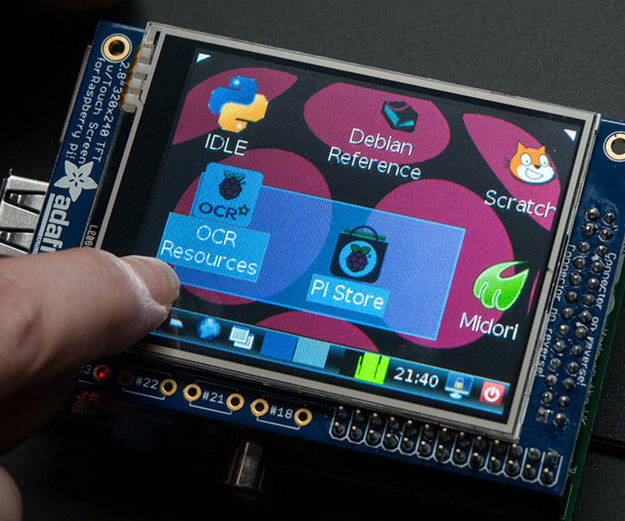
Featuring a 2.8" display with 320x240 16-bit color pixels and a resistive touch overlay.The plate uses the high speed SPI interface on the Pi and can use the mini display as a console, X window port, displaying images or video etc.
Best of all it plugs right in on top!
Uses the hardware SPI pins (SCK, MOSI, MISO, CE0, CE1) as well as GPIO #25 and #24.
All other GPIO are unused. Since we had a tiny bit of space, there's 4 spots for optional slim tactile switches wired to four GPIOs, that you can use if you want to make a basic user interface.
For example, you can use one as a power on/off button. See below for the link to get the optional tact switches, they're not included.
This version comes as a mini-kit, with a 2x13 extra-tall female header (to connect the plate to the Pi) and a 2x13 male header that can be used to connect an IDC cable or cobbler from the side.
The photos above also show the optional installed slim tactile buttons. The tactile buttons are not included, but you can pick up a bag of 20 here. Some basic soldering is required to install the headers.
Features
- Is this not the cutest little display for the Raspberry Pi? It features a 2.8" display with 320x240 16-bit color pixels and a resistive touch overlay. The plate uses the high speed SPI interface on the Pi and can use the mini display as a console, X window port, displaying images or video etc. Best of all it plugs right in on top!
- It's designed to fit nicely onto the Pi 1 Model A or B but also works OK with the Pi 4, Pi Zero, Pi 3, Pi 2 or Pi 1 Model A+ or B+ (any Pi with a 2x20 connector) as long as you don't mind the PCB overhangs the USB ports by 5mm, see the photos above. If you have a modern Pi with a 2x20 connector, you may want to grab a PiTFT 2.8" Plus which does not overhang
- Fully assembled and ready to plug into your Pi!
- We've created a custom kernel package based of off Notro's awesome framebuffer work, so you can install it over your existing Raspbian (or derivative) images in just a few commands. Our tutorial shows you how to install the software, as well as calibrate the touchscreen, show videos, display images such as from your PiCam and more!

Top Reviews
Point-and-shoot cameraby Chuckles, the Ferocious Chihuahua (4 out of 5 stars)
April 19, 2016
The screen is a bit too small, but it does its job well. Built a point-and-shoot camera using this.
Works, but better as a supplement
by Brian B. Griffiths (3 out of 5 stars)
November 15, 2015
This is pretty nifty, but it has a few issues. 1, it overhangs on the newer rasberry pi. They tell you that, but I'm not very good at reading so I didn't know and when I installed it I was like "oh, that's ugly."
You can't just use this thing straight off the bat. You have to install a bunch of stuff to the SD card. Which doesn't work if you don't have a monitor for it in the first place. So I ended up having to get an microSD card reader from another seller so that I could install the software from my real computer to this. Don't get this thinking you can start a new setup (unless you have a card reader already). Helpfully, their site did have a package you can download and install that has all the drivers and what not.
Unfortunately, you can't see the whole desktop on the small little monitor. I've searched and searched, but there seems to be no way to get the whole thing on. This screen seems like it's not made to be the main screen, but serve up graphics/info from another program or an app built specifically for it. The resolution is just too small to be useful as the only screen for a computer.
Because of these issues, I'm afraid I have to rate it a little lower than it probably deserves, but they could make it a little more clear that this isn't a good alternative to a full-size monitor.
Good, but tricky setup.
by Galen (3 out of 5 stars)
March 14, 2015
It works great for the price, but the touchscreen doesnt work very well for dragging. Its also a tricky setup, but i got it working. Its great for checking whats on the console if you dont have an HDMI monitor around!
COMES ALREADY ASSEMBLED
by Jeremiah K. (1 out of 5 stars)
July 29, 2019
If you are looking for a ASSEMBLED PiTFT 320x240 2.8" touchscreen display for raspberry pi then this is perfect for you. However, if you are looking for a KIT with the header pins NOT ALREADY SOLDERED ON (like it says in the description) this is not the display for you. Display comes preassembled, not as advertised.
Nice little screen for the Raspberry Pi.
by Kindle Customer (5 out of 5 stars)
November 22, 2014
Screen works well, with fingers or with a plastic stylus. Easy to install, easy to configure. Advanced configuration straightforward using website instructions (Adafruit).
Only Gross Motor Skills Needed
by Mark A. Malo (4 out of 5 stars)
January 19, 2015
Good for displaying your X-top...but lacks some usability (or maybe my fingers are just too gargantuan).
Setting it up on the Raspberry Pi was uneventful. I followed the detailed install the first time (I had changed SD cards, and then reinstalled Raspian) and then the easy install. Both worked first time. It can be used to display the boot sequence and the console (although it is initialized late into the boot process, so you don't get to see the Raspberry at the beginning) and when you do not have it installed, the booting can seem laggy.
Our application for this product is basically two touchable buttons (large) that fill up the entire screen, so it works as expected, but trying to tap/double-tap/drag the icons on the desktop is an exercise in futility.
I have not tried it with a stylus, but will and shall update this review after doing so.
It works, but you really need to use Adafruit's distro
by Nick (3 out of 5 stars)
March 26, 2016
Eh. It works, but you have to install their distro, or hack their kernel stuff into your install. I wish there were a way to make it work without that.
Awesome, but beware you must use Adafruit's special kernel ...
by Patrice Maljanian (5 out of 5 stars)
January 11, 2016
Awesome, but beware you must use Adafruit's special kernel for Raspbian. I think you can also get a version of Kali Linux with the kernel, but most stock OS's wont work. Please let me know If you find another one that works!
Better purchase some 2 sided adhesive tape
by Prime Enthusiast (3 out of 5 stars)
November 24, 2014
The PiTFT looked to have been used. The adhesive strips on the back of the LCD were already peeled and have lost it's "stickyness". The ribbon connector was disconnected from the board and it took me a few minutes to figure how to put it back in. (For those interested, there are two black tabs that you pull out sideways to unlock the clip.) . I did get it to work using the guide on Adafruits website and everything seems to be working fine.
Great little monitor
by Tjololo (5 out of 5 stars)
July 27, 2015
I had to go online to figure out how to install the product, and it only works with the Raspbian OS. However, this product works fantastically. About 10 minutes of setup, and I now have it working to both show the desktop and show the console. It negates the need of having a monitor installed or SSHing into the system to do standard commandline stuff. The graphical desktop isn't the best (because the screen is so small), but it does work. I haven't tried a video on it, but based on the performance I've seen I don't think the videos would be too bad.
Pros: Easy setup, good response. After calibration it seems to work very well.
It has spaces for 4 buttons (not included). They need to be soldered into place, and then there's some setup involved with those, but the entire procedure is documented on the adafruit page for the LCD kit. Just search for "adafruit pitft lcd kit" and you'll find the entire setup procedure.
Finally, and most important IMO: You can *remove* the LCD screen without any issue, the pi continues running. However, if you try to install it while the pi is on, it will crash.
Cons: It needs an extender to be able to fit into my case, and I've been told that lowers performance substantially. I have yet to get that, but I don't think it'll be an issue because I'm not using it for anything super complex.
Also, it extends a little off the side of the unit, overlapping the USB slots a little. This isn't a problem for me, but if you're planning a custom box for it be sure to take that into account.
Finally, it appears that there's maybe a 5-10px border around the sides that cannot be accessed with my finger. It may be possible with a stylus, I didn't try, but keep that in mind.
Customers Who Bought This Item Also Bought
- HATCHBOX PLA 3D Printer Filament, Dimensional Accuracy +/- 0.03 mm, 1 kg Spool, 1.75 mm, Blue
- Adafruit PowerBoost 500 Charger - Rechargeable 5V Lipo USB Boost @ 500mA+ [ADA1944]
- HATCHBOX PLA 3D Printer Filament, Dimensional Accuracy +/- 0.03 mm, 1 kg Spool, 1.75 mm, Red
- Adafruit Breadboard-Friendly SPDT Slide Switch [ADA805]
- Adafruit PowerBoost 500 Basic - 5V USB Boost @ 500mA from 1.8V+ [ADA1903]
- Adafruit PowerBoost 1000 Charger - Rechargeable 5V Lipo USB Boost @ 1A - 1000C
- 2298 - PiTFT Plus 2.8in Resistive Touchscreen for Raspberry Pi
- Adafruit 328 Battery, Lithium Ion Polymer, 3.7V, 2500mAh, 2" x 2.55" x 0.30" Size
*If this is not the "Raspberry Pi Touchscreen" product you were looking for, you can check the other results by clicking this link
 .
Details were last updated on Oct 13, 2026 06:41 +08.
.
Details were last updated on Oct 13, 2026 06:41 +08.