Smart Outdoor Security Light | |||||||||
| |||||||||
Product Description
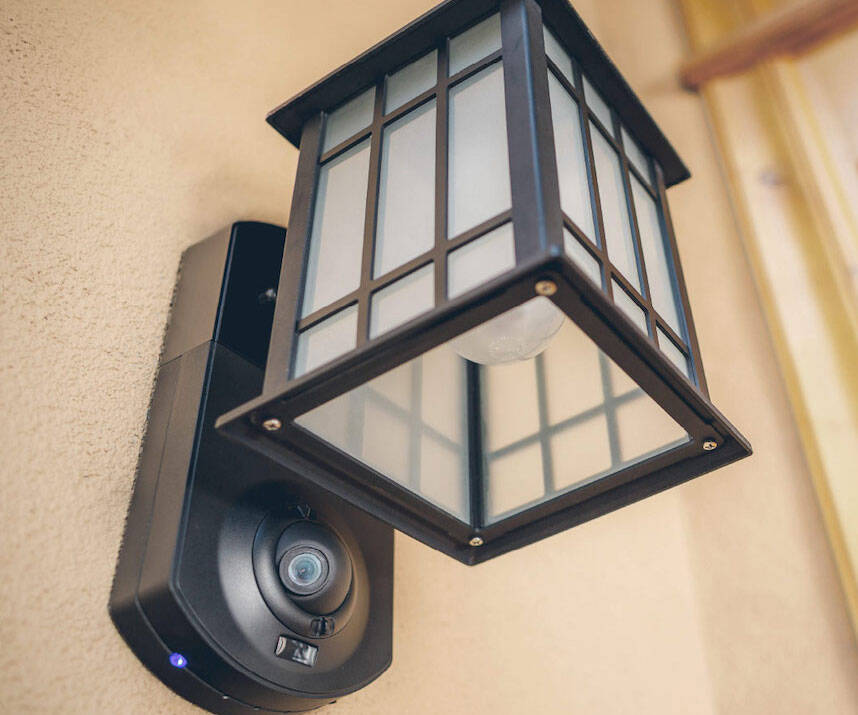
Night or day, Kuna’s smart outdoor security camera system detects movement at your door and sends actionable alerts to your iOS or Android device, allowing you to safely take action using Kuna’s lights(s), HD live video feed, two-way intercom, prerecorded deterrent messages, and 100+ decibel siren.
Features
- Compatible with Amazon Alexa. Control your Kuna powered smart lights. Kuna is a smart home security camera in a stylish outdoor light that detects and allows you to interact with people outside your door.
- The security device includes HD live and recorded video, two way intercom, alarm, smart motion detection alerts to your phone, and more
- Easy 15 minute installation with no batteries to replace so you have continuous protection around the clock; Weatherproof: Tested in -40F (-40C) and 131F (55C)
- Be protected at all times. Access HD live video with 720P wide angle camera and two way intercom, 100 dB alarm siren, smart light control. WiFi and Bluetooth 4.0 for easy setup with iOS or Android devices. 120V to 240V Energy efficient continuous power supply. US and Canada ONLY
- Access live video or review and download events for 2 hours for 30 days on an optional subscription plan, starting as low as 4.99 per month

Top Reviews
Kuna Security light (aka Maximus security light at Home Depot)by KH (3 out of 5 stars)
October 2, 2015
I have two of these installed at the front entry doors to my home, I like them a lot. They are well built and look very nice - much nicer than alternatives like the Ring doorbell. I had no problems connecting them to my router and getting the Kuna app to work with them. The video quality is very good and the audio is good too. I use the iPhone version of the Kuna app; it sends notifications instantly when it detects motion. The software has performed very well, definitely not buggy which says a lot for a "V1.0" product. There are a few downsides that you should be aware of:
1) they offer no phone support (pre-sales, technical, or otherwise). If you have any issues you have to communicate by e-mail ... good luck with that if you're in the middle of installation and have problems.
2) if you want to view recorded video, that is a PAID service ($50 annually for a single camera) after the free 30-day trial. If you don't subscribe to the service, all you get is live video. If you're using the camera for security purposes, you really need recorded video.
3) their system is closed: you can't stream live video from the camera to any other application (for example a web browser, an NVR, etc.) ... the Kuna app is the only way to view live video. You can download a copy of recorded video (assuming you've bought that service), but ALL video is stored on their servers. You'll have to judge if you're comfortable with trusting a company - that doesn't even list a phone number - with video that potentially details the comings and goings at your residence.
4) the cameras don't have infrared lights ... In order for them to be useful after dark, you'll have to keep the lamp turned on.
I think this product has great potential, if they get a real support system and integrate better with other home security/automation products.
Updated 2-2-2016
I have been using my Kuna lights for 4 months and I can say that they have been very dependable. They are the first line in my home security setup (since both of them face towards the roadway and cars entering my driveway). On more than one occasion they have helped me to shoo away unwanted solicitors when I was away from home. They have also been invaluable when one of the kids gets locked out of the house, they can get my attention (Kuna app will keep sending my iPhone notifications while they stand at the camera) to remotely unlock the door. I have also noticed that the Kuna live video stream is very responsive with no noticeable lag; I'm watching essentially a real-time feed, compared to my Nest Cam (also facing towards the road, for comparison) which has a lag of up to 10 seconds (both set on 720p, both cloud-based solutions, both using the same local router/network).
I *really* want to see this product provide IFTTT channels for the motion detection, alarm feature and light controls; and also a LAN-accessible video stream to integrate with my other IP cameras.
My rating goes up to 3 1/2 stars based on the reliability and performance, even though I can't mark 1/2 of a star.
Updated 7-12-2018
One of my lights stopped sending video - it will connect to my WiFi and I can otherwise control it (turn light on/off, etc.) but no video.
I contacted their customer support, who determined that it was defective and beyond the warranty period ($199 device bought less than 3 years ago).
They offered a 50% discount on purchase of a new light instead.
Not happy with their lack of replacement support on the product; I have experienced much better coverage from other home automation companies like Schlage and GE.
Updated 3-22-2019
I'm now 3 1/2 years into using Kuna/Maximus products. They continue to be super-responsive and reliable. I'Ve noticed only 1 major outage over this time period, which is pretty good for IoT Devices. However there is one huge issue with these products, they DO NOT provide the ability to stream video to your video-enabled Alexa or Google Assistant products like the Echo Show. Kuna has had more than enough time (nearly 2 years) to provide this feature; Nest, Blink, Ring, Arlo, Canary and many other companies provided that capability long ago. Integration between Kuna smart lights and any other IoT device/service is severely lacking ... no IFTTT, no Stringify, nothing ... you can turn the light on or off using Alexa or Google but that's it.
Missing one important feature...
by EKanas (3 out of 5 stars)
May 2, 2016
I wanted to love this product but there is one major miss.... Night vision. Without floodlights this is useless in the evening hours. It's more of a doorbell than a security camera. As you can see from the images the light itself makes it even harder to see at night. The camera during the day is crystal clear! Seriously the best out there. The app and functions though are brilliantly designed. Probably the best I have seen in the home automation space. The recorded messages are a great touch but again, more of a doorbell than a security camera. The setup was a breeze. You may run into connection issues if you have a cinder block home. I really love everything about this but I have to return them because what I needed them for and the price, it's just not there yet.
Kuna and the light bulb bandit.
by Pen Name (5 out of 5 stars)
December 27, 2016
Kuna light is easy to install and link to my iPhone and it looks great. After I installed the kuna kight fixture after only one night i caught an individual aproach my home at 1:30 am with a sock on his hand he climbed my stairs and stole my light bulb. And he stole several more in my neighborhood with video i had we posted this on facebook many people saw the video . The story was picked up by a local radio station whose dj was also a victim of this creepy man it was then broadcast on wbz tv 4 in boston this thief is now known as the "charlestown light bulb bandit" if you google this charlestown light bulb bandit you can see the video. Well done kuna i will be installing more of these light at the other entrances to my house.
Das is goot
by The Troy (5 out of 5 stars)
January 19, 2017
Very good. I almost gave it four stars because it doesn't massage feet.........
The images and video are good quality. SEE IMAGES. I annotated how far each person from directly in front of the camera.
Motion sensing is good. No alerts have been sent due to the palm or tree branches blowing in recent storms. I initially reduced motion sensing to 80% but have put it back to 100% since the only thing that triggers an alert is a person walking up or large bus. Small passing cars and people walking on the side walk are not a problem. Some one will have to be walking to your door for it to send an alert, as you can see in my pic it took a slow large school bus to get that alert. Your alert will have a lag. By the time you answer it from your phone the person or raccoon will have been at the door for maybe 15 seconds.
I have one account ((the basic) that I share with my wife's Iphone.....I hates the Iphone, i have android . The interface to each device is simple to use and intuitive. You got to be a real monkey to not understand it. I would like a feature to play my own pr- recorded sound files but they only give you what they give you ....first world problems. I
Watching live video will eat you data like a snack.....if you dont have a 12G+ plan and watch it all the time you will pay with your ass.
The bulb I use a 100W (florescent) they say to use less.....I want to see the world when it comes on. SO in order to reduce the glare I'm adding a small piece thin black plastic to cover the bottom. I tested this by attaching it with tape worked like charm and no one will notice it
Installation was practically nothing. over it under 5 minutes. Once the unit was powered I followed the app instructions and BAM!...done....added wife...BAM!..done.
The basic plan should be good enough for anyone. if you think your gona be watching your live feed and play back all you videos ...you'll get over that the first day. it records 2 hours worth of clips. Each clip is ~ 1 minute..........tis alot of clips.
Piece of J!
by JP (1 out of 5 stars)
April 11, 2017
Don't waste your time and money with this piece of J.
I'm so disappointed in KUNA; I can't find enough words to describe my frustration.
Below are the "highlights"
1. Customer Service. You can only contact them by email, and with some luck you will get an answer in less than 24 hours.
Usually, they will take between 24 hours to 48 hours to answer your email.
2. They don't deliver. After a couple of rainy days, I got just blurry images. They offered me a new visor back in March, and it never arrived.
3. Too many defects. I bought this device in December, and I found issues every single month.
- The camara goes offline often, so you have to reset it.
- Blurry images after rainy/snowy days
- The movement sensor is not working anymore
- The cherry on top of cake: The single image you will see after all the above is a black screen with the following message "Failed to setup connection - Tap To Retry"
I gave up!!! I don't have the time nor the energy to deal with KUNA.
Update: KUNA send me a new device; it is not reliable sometimes records, sometimes does not.
Moreover, I wanted to change the email under which I registered the device so I contacted Customer Service. It is been a week, and I don't have a decent answer.
Cost of ownership is a joke
by sjo (1 out of 5 stars)
March 10, 2016
I have had my Kuna light for about 6 months now. It has huge potential, but has too many issues right now. The real nail in the coffin though is that if you don't give them $59 every year, you basically have nothing but a camera that you can view live IF it will connect at the time. This is not a company in busy to sell security cameras, this is acompany in business to rent you space on their servers every year.
Not ready for primetime
by Tyson Miller (1 out of 5 stars)
March 26, 2016
I really wanted to be good...its just not, at least yet.
For some street cred, I am not your average punter when it comes to tech. I would consider a tech expert who has spent roughly $30k on DIY home automation in the past 3 months alone. I have taken chances with kickstarters, spent countless hours rigging my entire new house up with devices for voice command, bought and tested every device under the sun really, and my honest opinion of the kuna lights are that they could be quite good but fail in real world use cases.
To start, I have recently installed 2 kuna lights about 15ft. from a top of the line ac router. I I also have higher than average internet speeds (see attached). Upon setup, everything seemed to work fine and dandy until I actually had some one at the door. With the cloud recording trial still active and everything installed correctly, the following situation became a common occurrence:
- someone at the door. Kuna app sends push notification
- my wife or I scramble to phone to get this push notification
- the app opens and we wait for it to load and by that time the person is likely gone
- the cameras show a black screen (I.e nothing) and sometimes an error to connect message (see screenshot attached)
- the person is gone from the door at this point and we end up killing the app and reloading it
- on the second try we may get lucky and the video feed loads or it may a screen with no image again
- we review the footage and see who it was at the door
- If we weren't at home then we check the app to see who was there. Since we decided to not cough up another $60 or so a year and this product doesn't allow you to use your own hard drive or whatever to store video, then the app is blank if we don't do this within 2 hours.
So basically do not expect this product to let you know quickly who is at your door, let alone communicate with them (video loads some of the time), and review the footage at a later date (unless you cough over more money). I really hope they can fix these issues in app/firmware updates but until then they get what is deserved - 1 star.
Pay $200 to be a field tester for the company!
by FriscoNate (2 out of 5 stars)
November 6, 2015
I really wanted to like this device. It is supposed to fill a gap in the market, and it makes a good attempt. Many of us want a camera at the front door that looks like a sensible part of the home. Here's what you really need to know:
PROS
- Camera quality is as good as it should be based on current technology (during the day, that is). Clear picture, reasonably clear audio.
- When it works, it does provide additional peace of mind for the homeowner.
- It looks attractive, and is not obvious from a distance. This means that by the time someone gets close enough to see what it really is, they've already been recorded (that is if, and when, it works.)
CONS
- It simply doesn't work correctly most of the time. My camera stopped detecting motion. Emailed company (see other reviews about the lack of phone support.) 3 days later I got a response that said that they were working on a software update that triggered this problem and it should be resolved now. It wasn't, so I replied as such. 2 days later I got a message telling me to power-cycle the device. That worked. Next day, exact same problem. Power-cycled again. OK. Next day, same thing. Emailed company again, saying that power cycling the device daily is an inadequate solution - what if you're out of town? Never heard from them on a long term fix.
- Customer 'support' is slow, if not nonresponsive entirely. See comment above.
- If you talk to someone at the door through the app and device, your side of the conversation is not recorded. This matters because if someone else in the home speaks to someone at the door and you happen to view the recording, the only thing you'll hear is the voice of the person at the door.
- They claim that there is no night vision because the light facilitates the HD color recording of the camera. This would be true, except for the placement of the light. Take any camera you can find, put 1000+ lumens of light less than 3 inches above the CCD and see how much you can see and record. I'm sure if you're reading this far, you know enough about tech to know the implications, and that the video is worse than useless at this point. I have to believe its more likely that the inclusion of the IR tech would have raised the cost to the point that the consumer price point goes higher than $200, which they realized was not a good idea from a marketing standpoint.
- They don't tell you this in the spec, but make sure that you have 5-6 inches of relief on either side of the installation location. My previous porch light was smaller and I barely got this to fit with some 'engineering' that created displacement from the junction box location.
The bottom line is that this company has rushed to market to get first-mover advantage and to establish the brand in the marketplace. Our friends at shark-tank would say that 'you have a product, not a company.' The fact is that the company is simply not big enough to offer phone support, as detailed in other reviews. They also have not nailed the software piece, which is why 'updates' are sent 'seamlessly' to the device, but their updates rendered my device useless. The device became useless because it must be power-cycled daily. The company doesn't appear to know why this is happening, which is why they haven't responded to my repair request. They did, however, tell me during my earlier call that they looked at my 'log' files and confirmed my diagnosis that the camera wasn't responding to motion activation and not recording. If you think about that, though, combined with the fact that they have 'included' 'free' cloud recordings as a 'trial' until they 'get the pricing model straight' for the recording service, then a discerning consumer can figure out that they are keeping the log files and recordings on their servers so that they can scrub the data to assist in software development.
YOU GET TO SPEND $200 TO ASSIST THE COMPANY WITH FIELD TESTS, DATA COLLECTION AND TROUBLESHOOTING. YOU PAY A PREMIUM TO BE AN EARLY ADOPTER, WHICH THEY REALLY NEEDED TO FLUSH OUT THE BUGS. TRUTH IS, WHEN THEY GET IT FIGURED OUT THEY SHOULD SEND YOU ANOTHER ONE AS A 'THANK YOU' FOR HELPING THEM GET A WORKABLE PRODUCT TO MARKET.
I'm sure you'll soon see a company reply that says that this is not the case, but you and I know better. Consider the alternative - that they are convinced that the product was completely ready when it went to market and that I am in the sixth sigma. If that were true, they would replace the one device in the million that went wrong and move on down the road. Either way, you can draw conclusions about what either of these actions would mean (keep troubleshooting my problem without communicating with me or send me a new device as this one is a fluke.) My opinion is that I have inadvertently become a beta tester.
Then again, perhaps you won't see a reply at all!
UPDATE - March 15, 2016
I did receive a replacement device, which works as I originally described. That is to say that the nighttime functionality is nonexistent (no passive IR) and the daytime detections that aren't false alarms are notified too late to be of any real use. It functions like any other exterior cam - it may have some video to use AFTER the break-in has occurred, but you can get that same functionality from a device that doesn't cost $200.
Horrible connection issues
by Daniel (1 out of 5 stars)
March 30, 2016
When it works it's an awesome camera. However, I have had constant connection issues with the live camera. I live in a bad neighborhood and had someone jump over my gate looking for something to steal. All while the I was at work and the camera was disconnected. The only reason I know is because my neighbors informed me. I've contact the support team twice. The first time they suggested that my wifi connection speed was too slow and that is why I was having issues so I went out and bought a wifi extender still having the same connection issues. Here is a copy of the email I received from the support team after I was still having connection issues and emailed them the second time:
"Hi Daniel,
Thanks for reaching out to us! It does look like your Kuna is now picking up a great wireless signal strength on that FiOS-X1XYC_EXT extended network (hovering around -45dBM).
But it does look like your Kuna is currently offline
- will you please take it through this setup process to reconnect it to your wireless network?
If you run into any issues, or if your Kuna's status LED is flashing a color other than red, please let us know!
-Nicole
Customer Success Manager
So I guess every time I have connection issues I either have to wait for it to come back online which can take several hours, or I have to go through the entire camera setup every time. This defeats the purpose of having a camera I can monitor from somewhere other than my home.
I also bought this when the cloud service was free now I have to pay $58.99 per year to be able to save my recordings for more than two hours at a time. As it stands I'm not very pleased with this product and I really hope with all the money they're making they can develop a more stable device in the future.
Arguably a better choice than Ring... read on
by Biocrim (5 out of 5 stars)
May 26, 2017
I read several positive and negative reviews before pulling the plug and purchasing three of these.
Installation: The basic connection is the same as any other exterior wall mounted light so not much to say there. Kuna does provide a tool to help you set the length of the mounting screws, though I found on all three lights that the screws needed to be set out a bit more than the tool set them at. They also provide a handy hanger so the light can hang while you connect the electrical. A word of advice, if your exterior is rough (stucco) then you might want to temporarily place a towel over the fixture to prevent scratches while it's hanging. I did and I'm certain it would have been badly scratched if I hadn't.
Set up: Connecting to my Wi-Fi via the app was super easy. After you connect, don't even bother with the device's app settings. The first thing you need to do is update the firmware. This will take 10 minutes or so and I found if you close the app while it's doing this that it stops, causing you to start over again. I noticed too that the app says it's updating even after it's really done. If you close the settings for that camera and then go back in it then says Firmware Up To Date. So Kuna, please fix this. It occurred on all three devices so it's not me. After the update I made my preference settings.
Post Set up: The default sensitivity is set to 95. I had to play with it a bit to get my side garage and front door lights to not give false detection. I cannot figure out what was setting of the side light other than some fruit trees swaying in the wind. I ended up setting my front one to 89 and my side to 90. I've not had one false alert since doing this and it always kicks off when someone is there. Another note to Kuna here. The slider for sensitivity has a range of 0 to 100. You can have a nervous breakdown trying to get the thing to stay on the setting you want. It's too sensitive for the scale. When you lift your finger it tends to change from the desired setting. I also question the need for a 0 to 100 scale since I suspect you'll never go lower than 85 or above 95. Maybe a 0 to 20 scale would be sufficient plus the ability to directly type in a setting number? Also, please, please, please add a switch in the app to quickly turn detection off. I'm having guests over this weekend and I don't want the back yard detection going off and recording every few minutes. I can turn off the notifications, but it will still be recording videos like crazy, which would be eating up your server space!. I also don't want to just power it off.
Additional: Their price plan is not as competitive as Rings. Ring is $10/month for 6 month video storage for unlimited devices. They also warranty your devices for life under this plan with free replacement. Kuna on the other hand only gives you 14 days video storage for $9.99 for only 4 devices. To get this price you pay annually, otherwise it's $14.99/month. Yes, initial cost is $100 less than a ring, but I think you can do MUCH better with these plans. I hope you're reading this Kuna. Kuna did add Artificial Intelligence (AI) this Wednesday, but you only get it if you're on their $240/year Ultimate plan (can you say OUCH? $240, really????)). They say it will be available with the $9.99 plan in the next couple of weeks. Their AI will detect cars and people. It sounds like they are trying to develop this technology even further, so they got Ring beat in this area... for now. HOWEVR, I suspect there will be additional cost for the AI to be added to the plan. I don't see anything on their website regarding AI and its cost. I have the Ultimate Plan for the 2-week trial, but the AI doesn't work with that, which makes no sense to me. Coming back to cost... if AI will cost more then these plans will be exceedingly expensive given what you get in comparison to Ring's plans...IMHO.
Overall I'm very satisfied, though I only got my last camera light installed yesterday. Only time will tell how they will perform over the long haul. My main complaint is plan cost. Also, I don't know if it's Amazon or Kuna, but pricing has been all over the map this week. I paid $158 each. Then the next day the same ones were $179. Today they're $149 (not too happy about that). Set the darn price and leave it! The companion lights were $129 when I bought my camera lights and now they're $79. I'll be buying two of them soon.
One last word to Kuna... I think your selection of lights is perfect when it comes to style. However, can you please make a post mount light in the same styles? I have four more lights mounted to stucco fence posts in my front yard. Finding similar lights to match will be difficult to impossible. I'll happily buy four more if you make them.
Customers Who Bought This Item Also Bought
- Clear Dual Option, Toggle Style, Light Switch Guards | 3 Piece Pack | Security, Circuit and Child Protection for Indoor/Outdoor Wall Plate Covers | For Home and Work
- Craftsman Companion Black Outdoor Smart Security Light
- White Switch Plate Cover Guard Keeps Light Switch ON or Off Protects Your Lights or Circuits from Accidentally Being Turned on or Off.
- Toucan Smart Socket, Accessory for Toucan Outdoor Security Camera Smart Porch Light Fixture Control, Works Only with Toucan Security Camera
- Ring Floodlight Camera Motion-Activated HD Security Cam Two-Way Talk and Siren Alarm, Black, Works with Alexa
- Maximus Floodlight Camera Motion-Activated HD Security Cam Two-Way Talk and Siren Alarm, White
- Maximus Camera Floodlight - Black - Compatible with Alexa
- Toucan Outdoor Security Camera, Waterproof HD Video Surveillance System, Smart Lighting, Motion Detection, 2 Way Audio, Alert, Alarm, Recording, 2 Hours Cloud Storage, No Hard Wiring, 2.4Ghz Wifi
- Toucan Outdoor Security Camera, Waterproof HD Home Security Cameras Powered by Porch Light Fixture, Smart Socket, Turns Light Smart, 2 Hours Playback, No Hard Wiring, 2.4Ghz WiFi (2 Pack)
- Pinfox 10ft 14 Gauge 3 Prong Heavy Duty Replacement Power Supply Cord Cable 110V 115V 120V Pigtail for Universal AC Appliance, NEMA 5-15 Plug US SJT 14AWG (15A)
- Maximus Video Security Camera & Outdoor Light - Coach Black - Compatible with Alexa
- Maximus Video Security Camera & Outdoor Light - Craftsman Bronze - Compatible with Alexa
- Kuna Smart Companion Light (Camera-Less) - Craftsman Bronze - Works with Amazon Alexa
- Maximus Smart Security Light, Traditional Textured Black Finish, Compatible with Alexa, 450lm A19 bulb included
- Maximus Smart Companion Light (Camera-Less) - Traditional Bronze - Compatible with Alexa
- Maximus Smart Companion Light (Camera-Less) - Contemporary Black - Works with Amazon Alexa
- Maximus Smart Companion Light (Camera-Less) - Coach Black - Compatible with Alexa
*If this is not the "Smart Outdoor Security Light" product you were looking for, you can check the other results by clicking this link
 .
Details were last updated on Aug 24, 2026 02:21 +08.
.
Details were last updated on Aug 24, 2026 02:21 +08.