360-degree Car Dashboard Security Camera | ||||||||||
| ||||||||||
Product Description
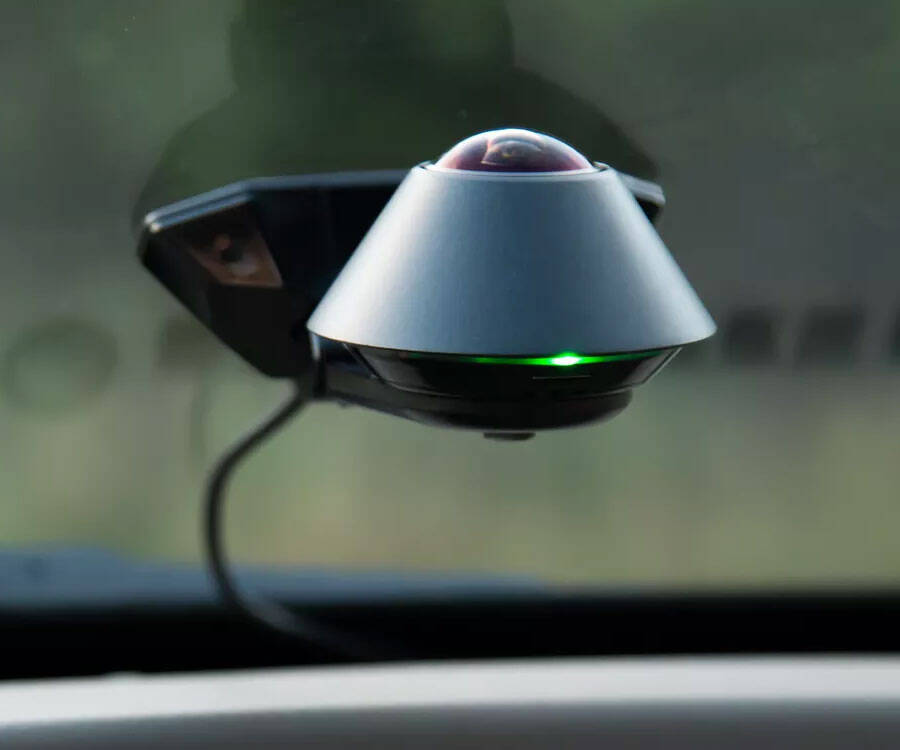
Waylens Secure360 is the connected 360-degree dash camera that captures everything going on in and around your vehicle, All the time, even when parked. The Secure360 blends Multiple sensing technologies to capture events, whether you’re in the car or away from it for an extended period of time. With the Waylens secure app, you can access video data, add highlights, and choose from multiple viewing modes to see the full story, such as immersive panoramic for a comprehensive view of your surroundings, or split screen to see both inside and outside the car.Features
- 360-degree vision: a single lens provides a truly seamless 360-degree view in and around your car. Lens : f/2.0 aperture. CMOS Sensor : Optical size 1/2.9 Inch
- Night vision: IR LEDs (infrared) help the Secure360 see in the dark and in low-light conditions
- Fast processing: high-performance ambarella Camera processor manages an abundance of visual data, providing sharp and clear video
- Advanced sensor Fusion: Fusion of Radar, 3-axis Accelerometer, and GPS provide intelligent event detection for your vehicle
- Smart power management: advanced power management Features protect an unattended vehicle for up to 360 hours or 15 day
- Bluetooth V4.0

Top Reviews
Good hardware, poor software, never could get it to work 100%by R. Johnson (1 out of 5 stars)
September 11, 2018
Nice concept and well-built unit, but the app software used to interface with this camera is very lacking, in my opinion. Has potential, but needs a lot of refining work to get it to be more intuitive and user-friendly so that the user knows what is going on, or if/why an error is occurring. I'm in software, and this software feels like it was "software written for software guys" as opposed to software that was run through extensive beta-testing and refined through guy-on-the-street type users, in order to be intuitive and easy to use.
App software doesn't give any indication of why errors/problems are happening with the camera, or what it's trying to do at certain points. Several times I had an 'hourglass' type logo come up with no text/indication of what it was trying to do. Errors due to functional/connection problems give no messages as to what the error is or why it's not working (ie: "not connecting, try this"). Never anything like that.
This camera runs in a passive mode when car is turned off, and an active mode when car is turned on, but the app doesn't distinguish clearly as to what mode it's in when you're trying to interface with it. Menus and options change as well, depending on what mode it's in. Which leaves you wondering where that option went that you were just accessing a few minutes ago. It would be nice if it told you "camera is off" or "turn on the car" in order to communicate. Instead, you wonder why the app won't connect to the camera, and after a while realize, "oh, maybe I need to turn on the car". Seems trivial, but it's pretty frustrating when you're trying to get the thing to work.
Video quality is considerably poor for a camera in this price range, which appears to be a physical limitation of the 360-degree lens with vertical camera (looking up at the sun all the time). Excess glare is also an issue. Hard to see details in the video, even of objects only a few feet away from the lens.
I received a camera which would never download recorded video. I wasted 6 frustrating hours fighting with it, and returned it for a partial refund.
Other issues:
1) To capture a quick camera shot of an event that happens on the road requires you to:
- Connect to the camera's WiFi via your cell phone (which takes about 10-15 seconds).
- Navigate into the recorded video view.
- Find the video clip of what you wanted to capture.
- When it's playing back, tap the star button on the display at the point you want to capture.
This whole process is practically impossible to do (and certainly not recommended) while you're trying to drive. Other cameras allow you to do all this with one push of a button, which is what this camera desperately needs.
2) I could not get the firmware update to work automatically. Only worked manually.
3) After firmware update, recorded video would no longer play back at all (buffers indefinitely).
4) After firmware update, recorded video would still not download, and download process wouldn't even begin at all (rather than trying and getting 50% like before).
5) Connecting to the camera from the cell phone app causes me to have to forfeit my internet connection, and be able to only communicate with the camera's wifi. I assume this is why the auto firmware update wouldn't work (needs an internet connection, and the camera provides wifi, but no internet). So I have to either connect to camera, OR internet- can't have both.
Seems its impossible to find a basic, straightforward, reliable dash cam, at any price. The cheap ones fail quickly, and the expensive ones have more fluff and bells/whistles than are worth dealing with. I need something reliable and "push button simple" that's also mobile that I can switch between 5 different vehicles. The search continues...
For a good review of this camera, watch the YouTube review by "Vortex Radar".
This camera saved us some serious money
by Kevin (5 out of 5 stars)
August 8, 2018
I bought one of these cameras after someone did a smash and grab on my car while it was sitting in our driveway overnight. We can't see a car that is parked in that part of our driveway from the house and I had initially considered buying a home security camera to capture the area. However, I still didn't feel it would have provided a clear picture of anyone who tried to break into a car parked there, so I started looking at alternate solutions. I eventually came across the Secure360, watched some videos, and decided that I really liked the idea of having the camera in the car, for a few reasons. First, if someone broke into my car again, the camera would provide a close up photo of whoever got into the car. Second, it would support any claim of what was stolen to my insurance company (there's a story there that I won't get into here). Third, it would help me remember what was in the car so I didn't leave anything off of an insurance claim.
What I didn't even consider at the time is how useful the camera is in the event of an accident. Unfortunately, my wife was involved in an accident while driving my car when pulling out of our neighborhood (a two-way stop intersection with continuous cross traffic) during the morning rush. It gets crazy there in the morning and is known to be a high accident intersection. Anyway, my wife had the right of way and began straight across the road. When she was just past the center of the intersection, she was hit corner-to-corner by a car that was turning left from the opposite stop sign. The other driver acknowledged it was her fault, and they moved their cars off the roadway to avoid a major traffic snarl. They called the sheriff for a police report, and then my wife called me. I arrived several minutes before the deputies since the accident was literally about five houses away. The other driver was crying and apologizing profusely to my wife for causing the accident. When the deputies got there, he asked them (together) what had happened. He took my wife's statement first and she recalled her version of the events. You can guess what happened next - when the deputy asked the other driver for her statement, she claimed it was her turn to go and that my wife was on the phone and never stopped, ran the stop sign, and hit her. Naturally no one who witnessed the accident stopped, so it was a complete "she said / she said."
After recovering from the shock and disbelief of this complete 180 turn in the other girl's story, I realized that we had indisputable proof. Using my wife's iPhone, I showed the deputy what REALLY happened. First, it showed that my wife had come to a full stop and had been stopped for several seconds as cross traffic cleared. Second, it showed that my wife had not even touched her phone the entire time she had been in the car (remember, this has a 360 degree view!!!). Third, my wife clearly had the right of way. Fourth, she entered the intersection as the other driver was still approaching the intersection. Fifth, the other driver never even attempted to come to a stop, but just slowed enough to look both directions (oh, but not straight ahead!). And finally, it showed that THE OTHER DRIVER WAS ON HER PHONE!!! That's poetic justice.
Needless to say, the deputy cited the other driver and stated fault as such on the police report. That didn't stop the other driver's insurance company from denying our claim, saying both drivers shared fault. However, they quickly settled when our insurance company used the video during arbitration.
So, in a long way, I've told you why I am giving the Secure360 five stars. I don't generally write a lot of reviews, but the Secure360 saved me thousands of dollars - I felt I had to write one.
By the way, the installation took me about 20 minutes. The wiring was easy - if you have access to a fuse box it really only takes one or two minutes to get continuous power and switched power. Routing the cable and tucking it in took maybe ten minutes since I'm really particular about hiding cables and stuff, and installing the camera on the windshield took maybe five minutes due to the excellent mounting template included in the box. The installation looks completely professional, and I actually like the way the camera looks in the car. The construction of the unit is absolutely top notch. I'm pretty sure it's an aluminum housing and it is very solidly built. This is not a cheap feeling or looking device. It feels substantial and it's clear that this is a high quality product. It doesn't vibrate or rattle or anything like that. The adhesive is incredibly strong and I know I'll never walk out to my car and find the camera has fallen off the windshield onto my dash. To that point, the adhesive (aliens developed it, I'm pretty sure) won't even come off if yanked on - so the likelihood of it being stolen is about zero. The video is very clear, and the audio sounds good on playback. I'm very confident that anyone who buys a Secure360 won't be disappointed.
Get a cheaper camera that will do the same for you
by Amazon Customer (1 out of 5 stars)
October 12, 2018
This should not give you a piece of mind by any means that your car is being monitored. Someome breaks in takes the camera and data is gone too. No internet connection, poor app design, not worth the price. I waited some time to see a good dash cam and was really hopefull about this one but falls short. Will be nice if cam can actually connect to the internet to save data on the cloud and really make a security device. For now if you just want to record you while driving there are better options for the price. My advice is buy something cheaper or get 2 cameras instead you will have a better view of the back if you stick a camera in the back window. This will get a good image of you driving but nothing on the back or very limitted.
Good camera, decent support, software needs development
by Samuel D. Self (4 out of 5 stars)
September 3, 2018
The camera is working very well. I'm still testing it out and seeing what it can do, but it's working as expected. It doesn't miss anything as far as I can tell.
One issue is that the Windows software for it, to manage and edit the video files, is really not very useful at all. It crashes on me more than not as well. The phone app seems better but it's not the most convenient way to view the video.
The camera saves the video in .ts files and then allows you to manage them and concatenate them and so on. On the phone app you can switch between the rear and front views and so on, but in the computer app al you get is the entire 360 degree view and it's not really good for picking out details.
Their supports takes a little time to get back to you but they are knowledgeable and helpful.
Ikage quality should be HD. In FULL VIEW.
by Terii (4 out of 5 stars)
October 3, 2018
I love the connection. Least bnb liked was the rear view.
About the night vision...
by Tony Williams (5 out of 5 stars)
July 13, 2019
The night vision is horrible, even o7t of the windshield or just doesn't work at all.
Get one
by Amazon Customer (5 out of 5 stars)
June 9, 2019
Love it. Works like it should
Try something else. a step towards something that could be better
by Jason Maki (2 out of 5 stars)
August 4, 2018
Bought this from waylens website. I have this set up to start recording when it detects motion but the sensitivity of the detection is really low. i had someone ding my car and there was no event. it will detect random things such as someones wipers going off but wont detect when someone is parking next to me. I feel it is almost pointless to have this camera because to even use some of its features you need to have the car powered up and engine on. Why would I want to watch around my car when im inside of it?
Amazing 360 degree coverage! Best dash cam by far!
by Johnny George (5 out of 5 stars)
August 9, 2018
This camera is awesome! I love the peace of mind that my car is being monitored while I'm away or driving. True 360 degrees not just one of those forward facing cams. It gets it all! It's well worth it, so YES I recommend this dash cam.
You loose your data even when car is running.
by Sandra McGlory (1 out of 5 stars)
June 5, 2019
The money that I purchased this camera for was not with it. I purchased to catch vandalism, died not work. Since purchasing my car has been in the shop twice, I go look up the incident and it does nothing. Too back to the installers twice they promised it worked, to no avail. Better off getting a cheap camera.
Customers Who Bought This Item Also Bought
- SanDisk High Endurance Video Monitoring Card with Adapter 64GB (SDSDQQ-064G-G46A)
- Samsung 256GB EVO Plus Class 10 UHS-I microSDXC U3 with Adapter (MB-MC256GA)
- Nilight NI-FH02 10Pack Small 12V Car Add-A-Circuit Tap Adapter Mini ATM Apm Blade Fuse Holder 2 Years Warranty
- 256GB V30 A1 Micro SD SDXC Memory Card Plus Adapter Pack (Class 10 U3 UHS-I MicroSD XC Card) Amplim Extreme Speed 667X 100MB/s UHS-1 256 GB MicroSDXC TF Card - Cell Phone, Drone, Camera
- SanDisk 256GB High Endurance Video microSDXC Card with Adapter for Dash Cam and Home Monitoring systems - C10, U3, V30, 4K UHD, Micro SD Card - SDSQQNR-256G-GN6IA
- Waylens - Secure360 4G Dash Cam with "Easy Install" OBD ll Power Cord - 360° Coverage - Advanced HDR Video - Smart Power & Thermal Management - Supports Class 10 MicroSD Cards Up To 256GB
*If this is not the "360-degree Car Dashboard Security Camera" product you were looking for, you can check the other results by clicking this link
 .
Details were last updated on Oct 14, 2026 03:16 +08.
.
Details were last updated on Oct 14, 2026 03:16 +08.