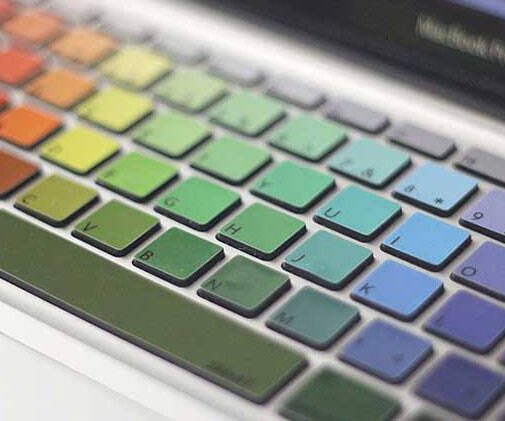
MacBook Rainbow Keyboard | |||||||||
| |||||||||
Product Description
Crocodil Graphics Rainbow Keyboard Stickers for MacBookProduct Features
-Keyboard Stickers for MacBook's. (NOTE: This is Not a Cover)
-Engineered to fit precisely to your MacBook Pro with or w/out Retina Display and MacBook Air 13-inch
-Amazing Thickness to minimize typing interference. Preserve the elegance of your MacBook
-Made with highest quality 3M material that makes Easy to apply and take off and do not leave residue
Product Compatibility Fits US(ANSI) keyboard layout only
-MacBook Pro 13" with Glossy Display (Model: A1278)
-MacBook Pro 15" with Glossy Display (Model: A1286)
-MacBook Air 13" (Model: A1369 and A1466)
-MacBook Pro 13" with Retina Display (Model: A1425)
-MacBook Pro 15" with Retina Display (Model: A1398)
-MacBook Pro 17" with Regular Display
-MacBook White 13"
Stickers NOT Compatible with:
European Keyboard Layout MacBook's
- MacBook's with Silver Keyboard
- MacBook Air 11-Inch Instructions
-Peel off the backing paper
-Carefully position the sticker on your clean item
-Then use a credit card or something firm to press the sticker firmly down
-Slowly peel off the adhesive paper on the front
-It's that easy
----------- Feedback--------------- -We would love your positive Feedback, if you are unsatisfied with your order in any way, please contact us before posting negative feedback so we can resolve the issue.
* Apple MacBook are registered trademarks of Apple, Inc. Products are Apple compatible and not endorsed by Apple, Inc.

Top Reviews
Awesome!by MarieStar (4 out of 5 stars)
May 8, 2014
I really love these stickers! I got the rainbow. They were pretty annoying to put on which is why I gave it 4 stars. I had to place and fix more than half of them. You have to be careful when peeling them off not to rip your buttons off. They're thick and durable so peeling them up 2 or 3 times isn't a big deal. Keep in mind that these are stickers and will probably peel or fade with lots of use. I highly suggest getting a clear keyboard cover to put over the keys to "preserve" them.
Awesome stickers!
by Jennifer1001 (4 out of 5 stars)
October 3, 2013
I love these stickers! They are very easy to apply. I was worried I would have to place each one on individually but the way it works is they all come together on one sheet with a protective covering on the non-sticky side. You peel the sheet off the sticky side and they all stay on the protective sheet, then you simply place the sheet over your keyboard, making sure everything is lined up, and press down. When it's all positioned, you peel off the protective sheet and it comes away easily, leaving no stickiness behind. I had to reset a couple stickers to get rid of air bubbles, but overall it couldn't have been easier. They look beautiful and even though they don't protect your keyboard from water spills or anything like that, they still help prevent oils from your hands from damaging the keys.
Some other reviewers have mentioned that since the stickers are opaque, the light from the keyboard doesn't shine through as clearly. This is true for the light signifying which letter the key is, but the light still comes out from around the outside of the key, and I have found that the light from my computer lights up the keyboard pretty adequately. I also tend to type without looking at the keyboard, so it's not really caused any problems for me. I think this is a great product, at the Amazon Prime price anyway. Not sure I'd pay $20 for it though.
Cheap, Colorful, and Cute
by Bree L. Ryan (4 out of 5 stars)
September 26, 2013
Lets be honest, if you're looking at this item, at this listed price, then you aren't here because you want high quality. I think that's important to note. This isn't promising to be the best keyboard protector in the world, it's just supposed to be colorful. And it succeeds at that.
I read the reviews before purchasing and I saw some people say the stickers take forever to put on. Well, if you do them 1 by 1, yeah it's going to be like that. However, it is shipped to you in a way that allows you to do it more efficiently. It is very similar to putting a decal on the front of your Mac or a sticker on your car.
Here's what I did:
- Take only the power sticker off of the sheet
- Place power sticker on power button
- while smoothening the sticker, turn off computer
- remove the clear sheet containing all the stickers from the plain colored backing it was shipped with (you won't get every single one but that's okay)
- center/angle/arrange your stickers above the corresponding keys
- place sticker sheet down, making all the stickers sit on top of the keys you want them on
- press down on every key to ensure it sticks properly
- remove clear sheet
- put all the stickers on that stuck to the backing in the beginning
- remove and recenter any stickers that seem off (be careful not to remove the button)
- Admire your adorable keyboard
That's pretty much it. It took me all of 2.5 minutes to do it.
Love it! Compliments for days :)
Hey lady, cool "rainbow keyboard"!
by Musings (5 out of 5 stars)
August 23, 2015
This is the second set of keyboard stickers that I have bought from Crocodil Graphics - had to have a set for my new computer because I get so many complements on my "rainbow keyboard". They fit both my 13" MacBook Pros (late 2011 and early 2015 models). The application is relatively easy. The stickers come on a clear backing - you lay the entire thing on the keyboard and all of the stickers are applied at the same time. You then remove the clear backing, leaving the stickers on the keys. I found the layout to be a tad off, so I laid ½ the sheet on, made sure those stickers were all secure, then started from the other side and did the same thing. Only a few needed repositioning. The colours in the product photo are what I received and I love the subtle rainbow colour change. Some people have asked about key backlighting: the stickers are completely opaque so they will cover up the backlit letters on the individual keys but they do not impact the backlighting surrounding the keys.
Adorable
by Stephanie K (5 out of 5 stars)
October 26, 2014
It's adorable. I've had tons of compliments. I actually have a macbook air, so some of the stickers had to be adjusted. They're still a little askew.
The one nit picky thing I'm not so fond of is that my fingers catch on the edges a bit when I'm typing. It feels rough. It's not really a problem now, just a slight annoyance, however, after it ages a bit I feel like it may cause them to peel off.
Update (after about 6 months or so of college heavy use):
Still staying on great, still getting constant compliments. However, I have a lab and I cannot for the life of me manage to keep hair out from getting stuck to my keys. It makes me all kinds of crazy sitting there picking at them.
Also, these hide the light up letter on the keys. The pattern has black letters printed on them, which can make it extremely hard to see during the evening/night. It's enough to make me considering taking them all off constantly, but it's just so cute that I never do.
Durable, held up well over a year later. Wish some symbols were a bit bigger.
by Kalia,Top Contributor: Pets (4 out of 5 stars)
April 11, 2017
I'm updating this review over a year later just to say that theses stickers have stayed put, all the air bubbles went away after a few days, as promised, and none have any obvious signs of wear and tear.
Frankly, I figured I'd be replacing this in a year, but instead it looks fine. Perfectly okay. I wish that the symbols above the number key row were larger, more like the actual keys, but otherwise, I can't really complain. The keys I carefully repositioned the day I applied -- you can't tell over a year later.
You may want to buy 2, for the price, just to ensure if you screw up heavily you have a back up, but I'm happy with the durability of the product and my laptop still looks snazzy.
who want to tell me how much they love my keyboard
by Jessie Jenkins (5 out of 5 stars)
October 13, 2015
Caution introverts!!! I am approached at least twice a month by people in cafes, conferences, random wifi hotspots, etc. who want to tell me how much they love my keyboard. It looks fantastic and draws comments and attention.
The application process requires attention to detail and caution, but it isn't anything too tricky, and they haven't peeled off (even a little) after almost 2 full years of regular use. I did have to trim the space bar key and one or two other keys in order for them to properly fit my 11" macbook air, but regular scissors worked fine and it hasn't had any sort of negative impact on their functionality. The only other negative is that the mac keyboard backlighting doesn't shine through very well any more, so if you tend to type in pitch blackness and need the lighting to shine through the white letter, this will impede that a little. Well worth it though, in my opinion.
I am super impressed by how well they've lasted and how vibrant the colors are.
Close only counts in horseshoes and hand grenades!
by Eric R. Shaver (3 out of 5 stars)
September 15, 2015
They look cool, wonderful concept. Important to note that the letters are not cut for the display to shine through. My particular graphic wasn't pre-assembled accurately enough for the stickers to line up well. I ended up taking them all of. The decal is a LITTLE overspaced. The first side of my keyboard lined up great with no space on the keys. The farther down the line you went, the more space the decals had over the edge of the keys (not up or down, but across the side; the width between each letter on the setting paper is too wide.)
They look nice, and once the adhesive wore off, I'm sure they would have been a pretty addition. Overall, I'm not completely satisfied, but it was worth a try!
It looked really cool on the picture.....
by Tanya Padkowsky (1 out of 5 stars)
July 22, 2015
I'm rather unhappy with this purchase.
The picture made the item look very bright and vibrant but the actual product is very dark. In fact, aside from my fingers now slightly sticking to the vinyl when I type and the lights being darker (they're slightly obstructed by the stickers) its hard to tell I put anything on my keyboard at all.
It also didn't totally line up with the keys. The right side where I started is pretty perfect but as you go across to the left the stickers are off center bc the spacing was too far apart on the clear backing part.
Also, the heat from having the computer on and closed cause air pockets under some of the decals where there previously weren't any.
I would not buy something like this again and I'm probably going to take it off soon.
LOVE IT!!
by Michelle (5 out of 5 stars)
May 27, 2015
I LOVE this! It is so colorful and beautiful and has the letters printed on the stickers so it's easy to read. The stickers are very smooth so it's easy to glide over while typing. The only two issues I have with it is the process of putting on and the fact that the stickers a stiff so sometimes my fingers will get caught on the edges, but it's brand new so hopefully it'll get worn in a bit. When I went to put it on, most of the stickers were stuck to the bottom white sheet, so after putting the other stickers on while using the clear sheet, I had to go back through and put some on one by one, but they were actually pretty easy to put on. I would highly recommend these to anyone looking to add a bit of flair to their keyboard.
*If this is not the "MacBook Rainbow Keyboard" product you were looking for, you can check the other results by clicking this link
 .
Details were last updated on Sep 17, 2026 10:34 +08.
.
Details were last updated on Sep 17, 2026 10:34 +08.