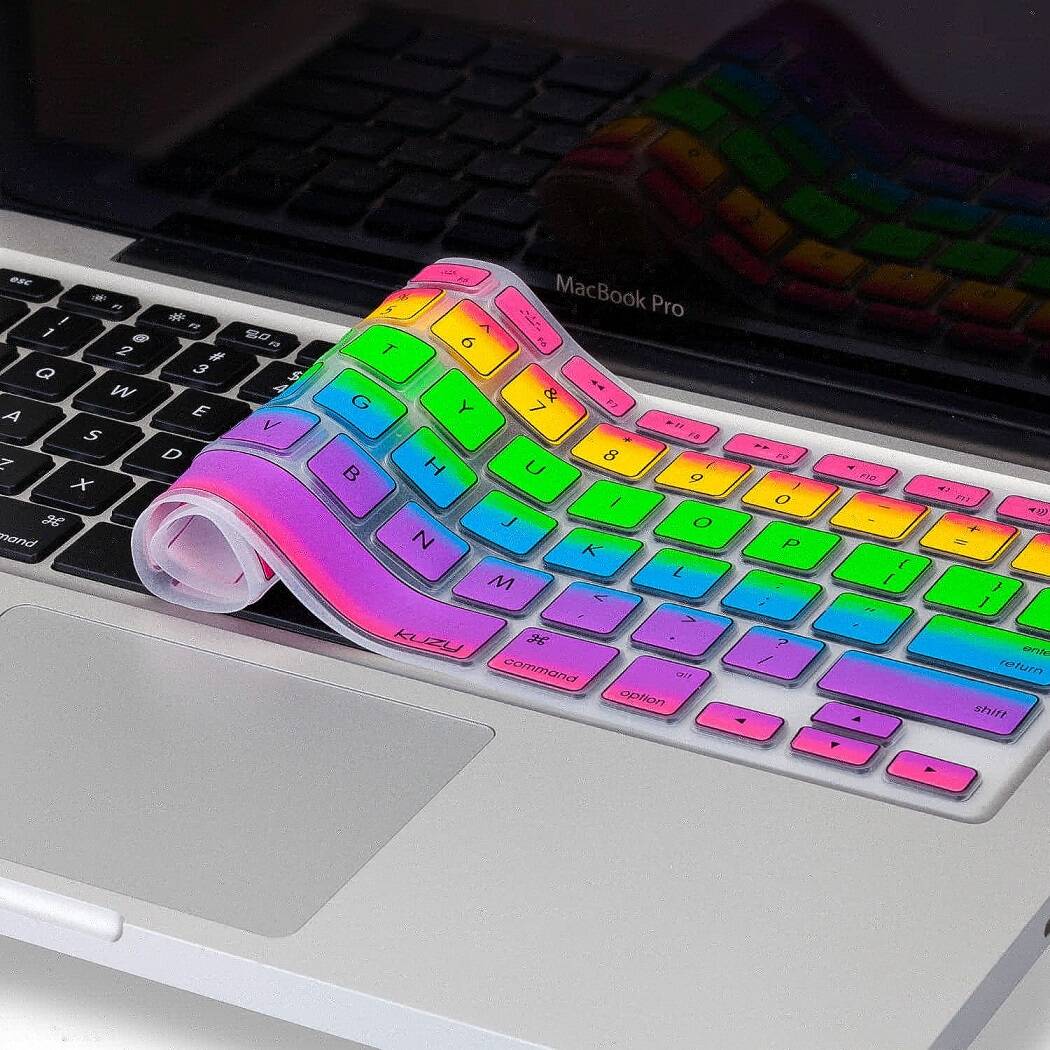
MacBook Keyboard Cover - Rainbow | ||||||||
| ||||||||
Product Description
Keyboard Cover Compatible with:
MacBook Pro 13.3-Inch with Retina Display
Newest Release 2015, 2014, 2013
Model: A1502
MF839LL/A, MF840LL/A, MF841LL/A, MGX72LL/A, MGX82LL/A, MGX92LL/A
ME864LL/A, ME865LL/A, ME866LL/A
Release October 2012
Model: A1425
MD212LL/A, MD213LL/A, ME662LL/A ME664LL/A
MacBook Pro 15-Inch with Retina Display
Model: A1398
Release 2014 / 2013 / 2012
MGXA2LL/A, MGXC2LL/A, MC975LL/A, MC976LL/A, ME664LL/A, ME665LL/A
ME293LL/A, ME294LL/A
MacBook Air 13-Inch
Model: A1369 and A1466
MJVE2LL/A, MJVG2LL/A, MD231LL/A, MD232LL/A, MC503LL/A, MC965LL/A,
MD760LL/A, MD761LL/A
MacBook Pro 13.3-Inch
Model: A1278
MC374LL/A, MC375LL/A, MC700LL/A, MC724LL/A
All MacBook Pro 15.4"- Model: A1286
All MacBook Pro 17-Inch
MacBook White 13-Inch
Cover NOT Compatible with:
— European Keyboard Layout MacBook
— MacBook with Silver Keyboard
— MacBook Air 11-Inch
* Apple MacBook are registered trademarks of Apple, Inc. Products are Apple compatible and not endorsed by Apple, Inc.

Top Reviews
Makes me happy everytime I see it.by lulu (5 out of 5 stars)
January 27, 2016
After a near disaster spill (will I ever learn to keep my coffee cup off of my desk?) I went searching for something that would give me a few more seconds of grace time before my computer fried out. Enter the Kuzy; bright, fun and promising to give my keyboard just a little more protection. My feedback? Love it. Looks great, feels great to the touch, keeps the keyboard safer/cleaner without sacrificing any sensitivity to touch typing, everyone asks me where I got it. Cheap too. I will definitely order more, as I'm sure that they will be my go-to emergency gifts for a while. I have a Mac Book Pro 14 inch, and it fits like a glove. The Rainbow colors are as vibrant as in the listing, but my photo is not as bright as I do not have the best lighting. Very happy with this purchase. Kuzy - Rainbow Keyboard Cover Silicone Skin for MacBook Pro 13" 15" 17" (with or w/out Retina Display) iMac and MacBook Air 13" - Rainbow
Works for Touch Typists, Safe to Keep On All of the Time
by The Compari-Shopper (4 out of 5 stars)
November 20, 2014
OK, rainbow might not be the color for everybody. I'm in a pretty artistic town so I can get away with it, even as an attorney. And, yeah, I am female. Whatever color you choose, you won't be disappointed with the product. I know it's an amazing price and you might be skeptical about the quality. But it's well made and nicely packaged.
It's super easy to open and remove from its packaging.
The cover itself is ultra thin and just lays atop your keys. I'm a little surprised but it has stayed firmly in place since I put it on. There is no adhesive or anything holding it in place. It just stays despite being soooooo thin. I'm using it successfully with a late 2013 13" Retina MBP.
It will protect against spills but might not extend beyond your keyboard far enough to prevent a spill from going to the edges and then getting underneath the edges of the cover and into the electronics in the main case. That's why I took away a star. If it were 1/8" of an inch longer at the top and bottom, it would provide far more protection. However, looking at competitor's models, I don't think anyone is offering that degree of protection right now.
What I was pleasantly surprised with was how easy it is to type with this cover on. If that's your hesitation, give it a try. (Amazon is great about returns, but I think you'll be pleased.) I am a touch typist and was afraid this might ruin my game. In fact, I touch type almost as fast with the cover on and have from the first moment I tried it. It is a different feeling and always takes a second to adjust to, especially when you're trying to hit keys with your pinky fingers. But the "F" and "J" keys have little ridges, just like a keyboard, so that you can orient your fingers by feel. It's a slightly spongy feeling but you can definitely tell whether or not you have fully pressed a key down by touch alone.
Also, you can safely close your MBP with the keyboard cover in place. It does not appear to affect the screen in any way (by, for example, indenting it).
I wish you every happiness, whatever you decide.
Definitely a repeat buyer.
by Elise (4 out of 5 stars)
March 6, 2016
I get more compliments on my rainbow keyboard cover than anything else. I've loved it for over a year! Overtime, it bubbles up in spots and doesn't lay quite as flat and the keys definitely look a little dingy after so much wear and tear but I think that I paid a little under five dollars for the product and it has lasted me over a year and could last me many more, I think. I wasn't sure if I was going to keep the cover on my keys when I first put it on because it felt awkward to type but after a week or so I couldn't even tell. Sometimes I take the cover off my keys to type without it and it feels uncomfortable. I also like that this quiets your keys as you type because I get complaints from my friends all the time that I type too loud and too fast! It's not really a problem with this product because, although you still hear someone typing, it's very muted.
I'm looking to purchase again and will definitely go with Kuzy when the time comes.
1 star off for the cover not laying flat for very long - it started bubbling after a month or so.
Great fit and look but not long lasting as they stretch out.
by Tacit Blue (4 out of 5 stars)
May 11, 2014
I'm using these for the Apple Wireless Keyboard (A1314) on my iMac and the initial fit is perfect. They look really good and protect the keys from dirt and liquids. The only initial drawback is that the caps lock light is covered so you can't tell it is on but I guess you could poke a wee hole in the silicon if that mattered to you.
However, after a few weeks' use, the warmth from your hands begins to distort the silicon in the most used areas (spacebar upwards to the E key for me) and gradually it becomes permanent. As the silicon stretches, the skin becomes slightly too wide for the keyboard and subsequently the fit and cling deteriorate. After a while, you'll find yourself constantly smoothing the skin to the side and attempting to re-lay it in order to minimize the increasingly large air pocket which forms over the center keys. The silicon never shrinks back so when it gets too bad, you just have to abandon that skin.
So to conclude: these skins are a great fun for the A1314 but plan on replacing them frequently.
Awesome Buy
by Lauren (5 out of 5 stars)
February 8, 2013
I bought this for my white macbook that I bought in 2010. It fits perfectly. I had a Moshe keyboard cover before that I bought when I first got my macbook, but it was clear and got very dirty. This one keeps my keyboard clean, stays in place, and looks beautiful. The only problems I have seen after having it for nearly a month is that the corner is curling up just a little bit on the bottom right corner where the directional keys are. Also the black lining around the 'I' 'o' and 'l' keys is wearing off just a little bit. Those are the keys that I use the most and also where I rest my fingers the most though so it is only to be expected. For 6 dollars this case is a great buy. It isn't the nicest case you can buy, but you certainly can't go wrong with it. I have gotten tons of compliments on it and it muffles the sounds of the keys without making it hard to type. Any keyboard cover on macbooks seems to dampen the sound from the speakers a little and can increase the heat if you are using your computer for any great length of time too, but I feel like those are minor issues. My computer rarely overheats with it on, and if I am listening to music then I can take it off (but I rarely do).
Lasts around 3 years with heavy use!
by Ali Lietz (5 out of 5 stars)
October 25, 2018
You can't beat the price, or the quality. For three years of daily heavy work-from-home Professor/writer use, this thing holds up. I know it's three years because I had worn through 4-5 letters and gave my old one to my nephew to play 'computer' with and looked up the last time I had purchased it from Amazon.
I get a lot of compliments bc of how bright the cover is, and how well it fits-- people thing I've purchased a special edition Mac or something.
In short, it is easy to wipe down, and it catches crumbs and coffee splashes (and prevents dog hair from getting caught in keys which if you're a pet owner-- you know that stuff gets EVERYWHERE no matter what you do). Highly recommend.
Hey Kuzy, how about a free one for the next 3 years? :)
Beautiful keyboard :)
by Lexie C (4 out of 5 stars)
May 29, 2013
The reason I choose this keyboard is because of the color and it really looked amazing. In all honesty this is a really beautiful color and it is actually looks better in person, the colors are more vibrant. The reason that I gave it a 4 star rather than an 5 star is because the black on the letters and symbols are completely covered therefore leaving making the backlight not shine through and harder to see the keys. I do know my qwerty keys with my eyes closed but not the top keys of the mac which makes it very difficult when trying to type in the dark. Another thing is you really have to get used to having something being on the keys and it slows you down a little while typing. It gets kind of annoying at time. But, overall it is a beautiful keyboard and I love it! In case you was wondering i have the latest MacBook Pro 13.3".
This Cover Saved My Keyboard!
by Redd in Texas (5 out of 5 stars)
February 17, 2016
I LOVE this! It is unbelievably thin and you can't even tell you have a cover on the keyboard. The lit keyboard even still shows through. I bought this primarily just to dress up my keyboard, and then accidentally spilled a cup of coffee on it and it saved my BRAND NEW very expensive Macbook Air (which makes this tiny investment worth it's weight in gold - try to explain to the boss that you just killed your new laptop with coffee). It simply lays on top of the keys and fits perfectly. It can easily be removed to rinse and dry off (tested already, see coffee incident) and put back on. I bought a second one so I can change things up (if I'm going to look at a keyboard for 8 hours a day a little variety is nice).
Happy little keyboard protector.
by Beverly (4 out of 5 stars)
June 12, 2015
It's hard to get all excited about a product that keeps me from getting crumbs in my keyboard, but I have to say that this one is so cheerful, yet non-distracting, I like it more than the other four I've used over the years. Sometimes a fun pattern can jazz up a utilitarian device, but an undersea model and a chevron would not work for someone who is keyboard challenged. This one works perfectly, fits very well, and seems a bit more substantive than others I've owned.
*Note: I've bought two more since the last review. Certain keys get more abuse due to nails and arthritis. But this brand is the one that works on my laptop. I strayed to another company on a whim, and was sorry. Back to this brand for me.
DO NOT buy a dark color!!
by WayneChicago (4 out of 5 stars)
December 5, 2016
Must pay attention to the color you choose. I bought the rainbow one, and even with the backlighted keys, I could not see the lettering on the purple keys. I'm basically a touch typist, but still it's nice to see the lettering on the keys. While the yellow allowed the letters printed on the rubber to be seen, the dark colors did not. It was miserable. After five days, I exchanged it with Amazon for a yellow one and boom, I can see what I'm doing again.
Nice fit on the keyboard of a 2015 MacBook Pro. I like that it prevents key wear.
Customers Who Bought This Item Also Bought
*If this is not the "MacBook Keyboard Cover - Rainbow" product you were looking for, you can check the other results by clicking this link
 .
Details were last updated on Jul 4, 2026 16:22 +08.
.
Details were last updated on Jul 4, 2026 16:22 +08.