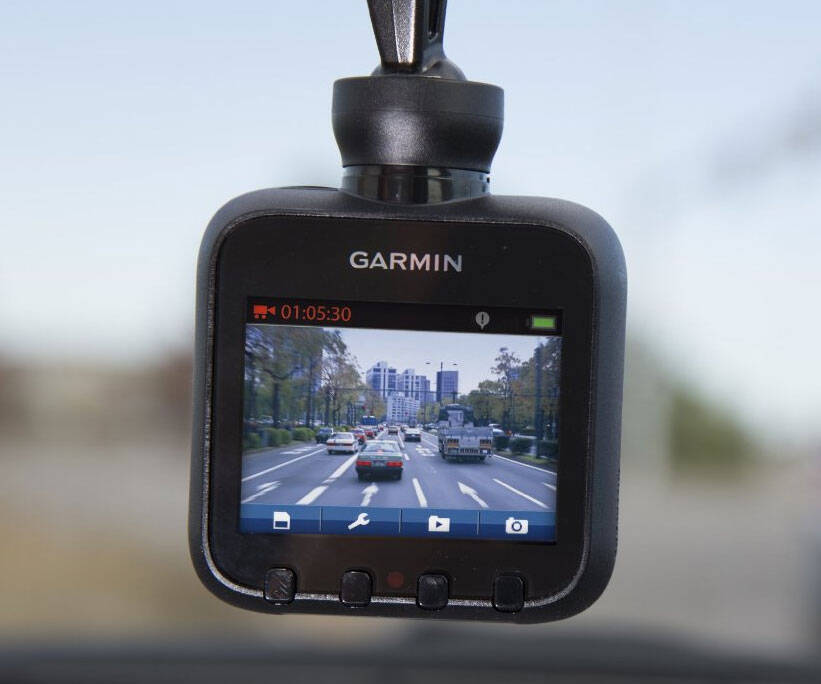
Car Dashboard Camera | ||||||||||
| ||||||||||
Product Description
Protect yourself from insurance fraud next time you get into an accident by installing the car dashboard camera inside your vehicle. This tiny cam mounts ... [Read more]
Features
- High Definition Records in WVGA, 720p or HD 1080p - Easy to Use Mount to the windshield, plug into a power source and start filming; no buttons needed to start recording
- Incident detection (G-Sensor) with customizable sensitivity settings automatically saves footage of collisions and incidents
- Snapshot Feature Take still images, even remove Dash Cam from your vehicle to capture collision damage
- Microphone Integrated Microphone gives you the option of recording audio inside your vehicle - Play it Back View files on the 2.3" LCD display
- GPS Dash Cam 20 Footage is stamped with location, direction, speed and time so you can see exactly where and when events occur when

Top Reviews
Not sure I'd try this again.by Amazon Customer (1 out of 5 stars)
May 3, 2016
It has a good pic. But after less than a month, it started freezing randomly.. So sometimes I can drive along for an hour and it's still recording- but most often after 5-15 minutes I'll glance up and see an unmoving frozen frame from miles ago. Sometimes it freezes while it's powering down and "powering down" will be frozen on the screen. During that freeze time none of the buttons work. The menu is inaccessible. IT has to be powered down manually and restarted...to work for 5 minutes. 20 minutes...who knows? AND the battery power icon remains at minimal power though it is plugged in all the time, and the charger light is on. Resetting doesn't stop it, nor does reformatting the card. My cheaper $29 cameras worked longer, and the Cobra for a couple of years before it acted up and did the same thing. I expected more from a Garmin. I see others have had the same problem.
It worked great for the first ~45 days
by Apaulo11 (2 out of 5 stars)
November 10, 2015
UPDATES AT BOTTOM
It worked great for the first ~45 days. Since then, two separate issues occur: 1) The menu buttons, time stamp, and battery icon flicker/disappear briefly causing the screen to wake up (video: (...)). A white screen with black text, "Powering off in 15 seconds" will appear for about 5 seconds - half the time the dash cam will completely power off while... plugged into power.
Update on November 20, 2015: After reaching out to Garmin support, they recommended updating the software on the Dash Cam using their software, Garmin Express. There was indeed an update for the Dash Cam and since the update both previous issues have been resolved.
Update on March 1, 2016: About a month after updating the software, both original issues started occurring again. I reached out to Garmin support 3 times, each a week apart, (each time I was promised a response within "3 business days") before they even responded to my request. As of today, I've been passed around to three separate "customer care" representatives. Each one has asked me in different ways to test the power cable for the Dash Cam. I'm fairly certain they aren't even reading my original request.
I'm now in the habit of pressing "cancel" to stop the Dash Cam from powering off while driving.
Update on March 19, 2016: After speaking to three separate Garmin support representatives, they finally issued an RMA. I shipped my defunct Dash Cam 10 on Monday, March 7 and received a refurbished Dash Cam 20 on Thursday, March 17. I'm not sure why they sent me a Dash Cam 20; there was no explanation and I didn't ask. I originally purchased the 10 not because of the price difference, but because it didn't record my location and speed. It's not a deal breaker that I have the 20 model now.
So far, the refurbished 20 has been working well. Hopefully, this will be my last update *knocks on wood*.
Review + INSTRUCTIONS: How to hard wire with no pop-up message.
by Chris1683 (4 out of 5 stars)
August 7, 2015
Overall I am very happy with the Dash Cam 20. The cam itself is very small and does not obstruct your view when driving. The auto-dim feature is nice and it keeps the screen on but at a very low light level which does not hinder night driving. The included 12V Car Power Adapter does not have sufficient length to "hide" the wire unless you opt to purchase their extended length charger available on the Garmin Website.
The quality of the video it records is good but in my opinion could be a little better. I think this is mostly due to the compression settings of the actual Dash Cam. It creates .AVI/H.264 video clips which will play natively on Windows, but will require a third party video player for a Mac (I used VLC Media Player).
I chose to hard wire the unit into my truck rather than use the included car charger however I ran into the same problem as previously mentioned by some reviewers. Upon start up, the until will display a message asking if you want to use the Dash Cam as a mass storage device. This does not stop the unit from starting to record but the message will not go away until you press cancel.
HERE IS HOW TO FIX THE HARD-WIRE INSTALL POP-UP MESSAGE:
If you run a hard wire dash cam power kit, you MUST use the Garmin Car Charger USB end. This was the ONLY thing that solved the pop-up message. I used a Wheel Witness hard wire kit (available on Amazon). What I did was cut off the hard wire Mini-USB tip which exposes the red and black wires within (red= power, black= ground). Then I cut off the Mini-USB wire from my Garmin Car Charger (be sure to leave some wire to work with). Cut back the Garmin wire sheath and expose the bare ground wire and white power wire within. Solder the bare ground wire to the black wire in your hard wire kit and solder the white Garmin wire to the red power wire in your hard wire kit. It is recommended to solder them and seal with heat shrink tubing. Power up your ignition and you will see that your Dash Cam now functions normally and bypasses the mass storage pop-up message.
I deducted 1 star on account that I had to destroy my car charger in order to hard wire this unit.
The camera is great. The mount is horrible.
by David Baker (1 out of 5 stars)
October 14, 2015
The camera continues to work fine. I like that I get GPS data encoded with the video. The biggest problem I have is the suction cup mount. It held on tight for the first month. Then one morning I get in my car to find the camera and mount on the passenger side floor. It fell off again three more times that morning just on the way to work. After careful cleaning of both the windshield and the suction cup on the mount, It still won't stay attached for more than a couple of hours. After which, If I can't catch it in time, it hits the floor or the car. Had Garmin Included a better quality mount with this it would have gotten the full five stars.
Edit - January 19 2016 - I downgraded my rating from three stars to one. After a few months of owning this device with it's horrible mount, I have had it. There was a time when I could retrieve the camera from the floor of the car where it had fallen and reattach it to the windshield. It would then last for most of the trip to or from work before falling. Now, When I attach the mount to the windshield, it holds on for a couple of seconds before falling. I have repeatedly cleaned the windshield and the suction cup. The camera is still great. However, the poor mount makes it unusable.
Reliable, High Quality, Rugged and Easy!
by KenW (5 out of 5 stars)
June 5, 2014
I've had this camera installed in my Jeep Grand Cherokee Summit for over one month. This Garmin Dash Cam is a GREAT product. It's worth every penny! The instructions were clear and concise. The install was as easy as a Garmin GPS. The SD Micro and Adaptor are included. The SD video playback works automatically and effortlessly in my Dell XPS12 Win8.1 computing environment. The settings are reasonably intuitive; it is a shallow learning curve and may take a couple of attempts to get where you want to be. It is, however, much easier than navigating Garmin GPS address search functions. The Event Recording sensitivity is easily adjustable. The camera, when power sourced, automatically activates as the vehicle is started and stays on for a minute or more (settings adjustable) when the power is turned off. CAVEAT: This camera records your location (close enough) and SPEED! So if YOU are the one driving CellTele Krazy -- don't use this camera! The camera is rugged with nothing to break or wear out just because it is merely and simply used. The combination of quality construction and automatic operation results in a reliable, rugged unit that is easy to operate. The interior audio recording may be on or off. The quality of the visual recording is outstanding. The suction cup attachment experience is the same as a portable GPS -- it works. A dash mount suction cup is available. There was not enough space to install between the Jeep's rear-view mirror and windshield so I mounted the camera centered below the rear view. It works just fine. This install location does not interfere with my driving vision. I remove and secure my camera, just as I would a portable GPS, during extended absences from the vehicle or leaving the wind-shield exposed to hot summer sun. The rearward facing view screen dims when driving so there is no distraction. The power cord from the camera to the vehicle power source is not a big deal -- It does not get in the way of my Slap Paddle (gear shift gizmo) or my MP3 Aux cord. Any minor inconvenience would certainly be nullified in the event of a crash caused by CellTele engaged idiot running his/her stop. I've had PLENTY of close calls in the traffic-volume dense W,DC Capitol area. One must be protected from the other driver creating the crash but who will readily lie and obfuscate. I'm now pondering the purchase of another Garmin featuring a 'rearview' recording. Three Hundred Sixty Degree coverage would be a GOOD thing! Thanks Garmin! I would purchase this product again in a heart-beat!
Plug It In and Go
by Marcus Strait (5 out of 5 stars)
May 16, 2015
I bought this Dash Cam while living in Italy because their drivers are so aggressive and generally ridiculous.
While this device has not saved me from any law suits, it has captured some hilarious (and infuriating) moments in my every day commute through Pordenone. I should not forget to mention, it has also helped me avoid a traffic light ticket when I was pulled over by Carabanieri for running a red light; they lollipopped me to the side of the road and tried to argue with me when I disagreed until I motioned to the camera and asked if we should take a look. They dropped the argument and let me go just because I was so confident in this camera.
BTW, it records very well at night (there are rarely street lights in northern Italy)
Thank you,
Marcus Strait
Drive safe. Eyes are everywhere.
by Old Tech (5 out of 5 stars)
November 22, 2015
Perfect size and weight. Super simple to use right out of the box. Clamps strong to the glass and stays as long as you clean the glass good. I use invisible glass cleaner. Reason I say all this is because of all the reviews on it keeps falling off.
It's almost out of sight when you run cable behind headliner and a-pillar. Oh yeah, about that. The 5' 8" charging cable isn't near enough to hide. So I had to buy another cable with it. A 10 footer did it for me.
Don't rely on battery power. This little guy sucks up power. You can tell by how warm it gets. If you use for an hour or less on battery, you should be good. But it's my professional opinion to use the charger at all times.
I also purchased a 32gig SanDisk and formatted it right away. I'll use the 4gig that came with it as a back up. Just make more sense to me.
It accepted an update right out of the box. Now running 3.8.0 so check that with Garmin updates. I was also surprised to see a sticky mount in the box so you do have another option other than the suction cup mount.
As for the rest, It's a Garmin product, it performs as it's designed to and does it well. You'll be amazed at the results as you view them on you first day out and about. Plus the security of it being your vehicle's "little black box"
After that you might forget it's even up there as you travel day to day. All the other reviews speak well about how it performs and it's functions. Any questions feel free to ask.
Update since purchase: froze up twice on me so far but the card was full. Don't know why it did that b/c it's supposed to overwrite. You have to hold the power off button 15 secs to do a hard reboot when it freezes. Anyhow, I connected it to the PC and just cleared the card out and it's been fine since then.
Edit: SanDisk 32MB card was faulty. I went back to my 4mb card that came with it and the freezing up stopped completely. I really don't think the dash cam is the problem. It's the memory card you insert in it. Just try it like I did.
Great camera, don't hesitate to purchase it!
by Paul (5 out of 5 stars)
July 17, 2015
This is my first review of a product I have purchased, so that should tell you how much I love this camera.
I had a GoPro on my dash for years, and got tired of starting, stopping, and formatting it all the time.
Purchased this camera much cheaper than a GoPro and have no complaints about it. The Texas heat would require that I hold my GoPro to the AC vents for several minutes before it would power up and run....This camera, no matter how hot the car is from sitting in the sun, powers right up when I turn on the key and stays running! The video is just as good as the GoPro, and with the auto startup and recording loop, I don't ever have to mess with it, it is always running when I am driving!
What I do with my Garmin GPS and this camera is solder a red and black wires to the cigarette lighter plug on the negative and positive pins, tape up the plug so that nothing shorts, then extend the wires to the fuse box and hard wire it in. I then ran the cable up the 'A' pillar and through the headliner and popped it out right next to the rear view mirror...no cables getting in the way!
I don't have any problems with the event recorder being too sensitive....seems to work just fine.
I would HIGHLY recommend this camera if you are even half interested in recording your driving....I am really thinking about getting another one and wiring it into the back window to record what's happening behind me!
Great little dash cam
by S Tyler (5 out of 5 stars)
July 12, 2015
What can I say? I love this thing. This is my first dash cam and I looked at reviews for days on this one and others before deciding on it. Most of the negative reviews just seemed to be from people who didn't know what they were doing. It's very simple to operate and watch your videos. I'm pretty happy with it. I do wish it had an option to shut off GPS for those times you might want to drive a little spirited and post the video. I do notice the sound is a bit rough if I have my stereo up at all. I think the sub is too much for it. I'll try and post a video. I'd highly recommend this dash cam though.
I'll touch on some of the negative things I've read:
Falls off window. I haven't had it happen one time. It stays attached just fine. Maybe their windows are dirty? lol
Freezes: Never experienced this.
Price: I don't think it's expensive at all.
Battery: I think its just fine. Of course it's not going to last for a long trip. It works just fine for trips across town, to work, etc. though. Half the time I don't even have to plug it in.
Size: I don't feel that it's too big at all. It does stick out a little below my rear view but not bad at all.
UPDATE: Apparently they ruin the videos so the one attached is not a good example. Please see the real video here:
http://youtu.be/nndAKUlkkdM
Best out of 4 Dashcams I've tried.
by Tim Hardeman (4 out of 5 stars)
November 16, 2015
I've gone through 4 dash cams.
Every one has had problems. Thankfully, the issues with the Garmin aren't critical.
The Garmin 20 is the first dash cam I've had which actually records everything. All the others had 2-6 second gaps between their files - and you bet every single event I wanted to record happened in that gap. This Garmin actually catches it all.
There are 2 negatives:
-Due to the wide-angle lens, distances are distorted. Objects appear much further from the camera than they are. This could potentially cause legal issues.
-Every 1000 hours or so of continuous use, the camera will completely flip out and require you to re-format the SD card in a computer. I doubt this will be an issue for most drivers, but I encounter it due to being a long-haul truck driver and keeping the camera rolling 24/7.
Customers Who Bought This Item Also Bought
*If this is not the "Car Dashboard Camera" product you were looking for, you can check the other results by clicking this link
.
Details were last updated on Oct 12, 2026 00:38 +08.