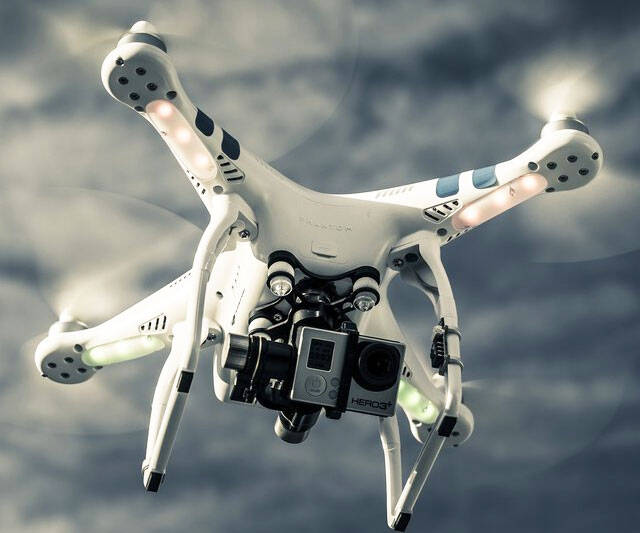
GoPro Mounted Quadrocopter | ||||||||||
| ||||||||||
Product Description
The Phantom 2 Quad copter from DJI brings all the features you love from the original Phantom but with 2X longer flight times and native support for the Zenmuse H3-3D Gimbal, which is included in this special bundle. With self-tightening propellers and a much larger intelligent battery that lasts up to 28 minutes on a single charge, the Phantom 2 is a significant upgrade from the original. The Phantom 2 retains the Phantom's fast setup and easy control layout so that you'll be making professional-quality aerial videos in just minutes. The addition of the 3-axis gimbal provides stability for all three dimensions of flight: yaw, pitch and roll provide super smooth stability for your GoPro Hero3 and Hero3+ camera.Features
- Zenmuse H3-3D 3-axis gimbal is included in this bundle for extreme camera stability and silky smooth video recording
- Complete quad copter and remote transmitter, pre-tuned by the factory and ready in minutes! Just charge the included battery, attach the propellers and add 4 AA batteries to the remote and you're flying.
- Fun flying by itself or even better with a GoPro to record the action. Tested with Hero3 and Hero3+ models, sold separately. Note: Wi-Fi streaming from a camera is not possible because it may interfere with the Phantom's remote control.
- Fly 25-28 minutes on a single charge using the included 5,200-mAh lithium polymer (LiPo) battery that's easily removable and contains intelligent circuitry and a charge-remaining indicator built-in.
- New self-tightening propellers means extra security and no worrying about lost prop nuts when you remove the props for storage.

Top Reviews
Fun Fun Fun - but don't rush to get it in the air :)by AlexC (5 out of 5 stars)
August 29, 2014
I have read the reviews - and I have to say the ONE thing I totally understand is people's frustration with customer service. This is clearly a company who has exploded in popularity and has not done well expanding their customer service. I have seen this time and time again on forums. However, with that said, I have also seen that MANY times (not all) people with no experience with RC flying models are not fully understanding the process of setting the Phantom up properly, calibrating and updating firmware etc. There is risk in this hobby - especially with cutting edge technology - and the only thing you can do is really understand the aircraft and read, read and read some more the forums of users who really know what they are talking about.
All of that said - I LOVE this thing! I have flown a bunch of RC heli's and I am sure that experience helps - but I can see how a relative novice could pick this up and get real enjoyment out of it! If you follow the instructions, and wait for a solid GPS lock - it really flies rock solid. For those with a little more experience - the ATTI mode (basically a bit more manual flight mode) adds the ability to really control shots and have some advanced fun.
I will say that the instructions aren't super clear (loading the software, knowing that you need to load drivers first etc). But there are some forums that have instructions written by members that really spell it out.
I literally can NOT wait to get home and fly this thing on the weekend!
Just take my advice - if you are new to the heli world - don't expect to get the box and have it in the air in 20 mins. If you somehow pull that off - you have probably missed an important step, calibrations step or firmware update. Take your time... read everything... and within an hour or two you'll be ready for your maiden flight - and it will be awesome!
DJI - hire yourselves some more CS reps - and splurge and get some in the USA - the Chinese to English chat I had was a bit hard to follow due to all the syntax problems I was having with the rep.
This was a great purchase!
The drone was easy to setup and flying it has been an excellent ...
by B. Stone (5 out of 5 stars)
December 31, 2014
Received this as a Christmas gift and have been blown away by the videos created with the GoPro 3+. The gimbal is so so smooth. The drone was easy to setup and flying it has been an excellent experience. Lots of ideas floating around in ways I can use this in 2015. One word of caution - make sure and purchase a lens protector for your GoPro. It can become scratched when landing (or crashing) because the camera has to be mounted outside of it's protective case. If you are on the fence about getting one, do it!
Right now I feel pretty disgusted. If I can't control the camera's pitch ...
by Bill Hutton (2 out of 5 stars)
October 21, 2014
I just received my new Phantom 2 with the H3-3D Gimbal. I also purchased an IOSD Mini, and a Kumbacam FPV Display. You might say I'm heavily invested. It all went together OK and worked except that the lever on the bottom of the controller that's suppose to control the camera's pitch angle (whether it's looking at the sky or ground) doesn't work at all. After hours of research I discover that this is a common problem. I ran all the tests, firmware upgrades and suggested calibrations using the DJI software with no effect. The lever that's suppose to control the X1 signal (the signal that controls the camera's pitch) is still completely inoperative. I've reported this to DJI. So far I haven't had a response other than an acknowledgement of the receipt of my complaint. I'm sure I'm not the first to report the problem. Right now I feel pretty disgusted. If I can't control the camera's pitch this whole setup is essentially useless to me and a waste of my money. In my opinion..... very much a case of false advertising. I wish I had known about this problem prior to ordering. Hopefully DJI will come up with a viable fix. I'll let you know if they do.
10/23/2014
Well DJI support sent me what appeared to be a programed canned response to my problem which helped me not at all! However I did find a solution online from another user. The controller X1 signal potensiometer (the lever on the bottom of the controller) that controls the camera pitch must first be calibrated using the DJI RC Assistant software. This is contrary to what the RC software directions say....DO IT ANYWAY! Then connect the Phantom 2 to the DJI Phantom Assistant software and calibrate the X1 channel again there. It now works! I don't know why but it does. Now everything works perfectly.
For Incredible Fun, This Is It.
by Bill Oterson (5 out of 5 stars)
August 18, 2014
10/12/14 Update: Encountered an issue being unable to tilt the attached GoPro and although I found DYI receptive to help I, instead, found a fix on the internet and within minutes had corrected the problem. Additionally, I've blundered, again, crashing the copter into low hanging tree branches and it fell to ground, about 5 feet. Only cosmetic damage and I repositioned it and went about learning to fly correctly. Very much fun.
I was a bit surprised that the "Phantom 2 Quadcopter with Zenmuse H3-3D" wasn't exactly 'plug and play' but the additional part that required installing was an opportunity for me to take the Phantom 2 apart and find out what makes it tick. And the video explaining 'how to' was excellent. In fact, I found the included instructions accurate and easy to follow. And there's quite a bit of information on the internet, too.
Did the deed, put it all together again and set it up, according to directions, and, in my backyard, it was in the air. The remote works really well and the Phantom 2 responds immediately to direction changes. In a short while I felt in command, but, then I got cocky (typical me) and sure enough while putting it through some, possibly unworthy, maneuvers I crashed, not once, not twice, but three times. I couldn't help myself :)
No problem, the Phantom 2 came through the experiences with no damage, except for some stain from the flora it landed on/in which was easily removable. I've since come to my senses, though. Took it over to the park and found the GPS functions as it should, and the gimbal keeps the GoPro pretty steady. What a delight - what fun to fly. I love it. If at all possible, you have got to get one of these. Did I not even mention exciting? Incredibly!
Update 9/11: I've had the Phantom 2 up higher than the lights, at the ball field, in a bit of wind gusts and am amazed at it's ability to automatically hover in place.
Great flying Quadcopter and the Gimbal works perfectly for flawless video.
by C. Ruppel (5 out of 5 stars)
September 24, 2014
I read some reviews where people belly ache about the bad customer service or the QuadCopter (QC) not flying right or spinning out of control and I wonder if these people did the calibration correctly when you put it together. I watched the YouTube video on how to install the gimbal and that went perfectly. I then re-read the instructions on calibrating the GPS function, after not doing it right the first time, and that went well. On my first flight in my back yard I backed it into some tree branches, but the QC survived. Just some green stuff on the blades from chopping up leaves. I then took it to a park near my house and had plenty of room to test it out. I flew it pretty high. High enough my neck hurt watching it, but luckily the QC hovers smoothly so I was able to back it down to Earth while only glancing up periodically. As far as advanced maneuvers go, I was able to master that pretty quickly as well. So the QC has great flight controls and is easy to learn. I would suggest flying in an open area until you get the hang of it, then taking it to areas with tighter maneuvers. Three flights so far and all have been right around 20 minutes. I noticed on my last flight. that was exactly 20 minutes, that the QC was losing power, so common sense told me to bring it closer to the ground in case something happened. Obviously the battery was nearly drained. Just fly with common sense and I'm guessing your experience should be every bit as awesome as mine.
The Zenmuse Gimbal is AMAZING! The videos I have shot so far with my GoPro Hero 3+ is awesome! The smoothness and stability of the video while making moves in flight is great. Every now and again, when you turn too sharp, one way or the other, you'll catch the little landing skids in video frame. That's a small price to pay though for Hollywood quality video. I also LOVE the fact that I can adjust the tilt of the camera from the remote. I can't wait to see what I can do with this QC and gimbal. Best toy purchase ever!
Now all I need is more QC batteries, and a FPV monitor. :)
A great drone overall, with a few tragic flaws
by Clayton Thomas (3 out of 5 stars)
July 7, 2015
I won't dwell on the positives, since DJI pretty well has this covered. The drone has a good range, is generally quite stable, and has a controller which is pretty intuitive. The gimbal is generally very stable and with a bit of practice, it's possible to capture some professional footage.
It's also worth metnioning that the body is small enough to pack into carry-on luggage, even if you're traveling on a European budget airline with the strictest size limits. I take my drone everywhere; I've flown this many times with it in a small suitcase without any issues. Just remember to leave the screwdriver at home so security doesn't hassle you!
Now for the drawbacks:
1. The orientation of the GoPro on the gimbal means that the landing gear often ends up in view, since the camera is not centered (it's significantly closer to the left landing gear). This might seem petty but if you're interested in producing professional footage, then it simply isn't acceptable to have pieces of the drone in view. If you flip the GoPro upside down, then the camera is properly centered and the problem disappears, but then the USB ribbon on the gimbal is too short to connect to the camera, and I've yet to find a USB extension which will work (the USB plug is not a standard one so a regular USB extension cable won't work - I've tried). Leaving the USB ribbon unplugged is one option, but in my tests it leads to a strange wobble in the recorded video. The gimbal appears to need this connection to the camera to give it proper stability. Aside from that, if you use a first-person view system like I do, then you won't see anything on the monitor if the ribbon isn't plugged in. The gimbal should have been manufactured with the ribbon on the other side so that the GoPro could be flipped over; this seems like a tremendous oversight. The problem is mostly confined to right-hand turns, since the camera is closer to the left-hand side, but it also manifests when the camera is pointed straight down. To a large degree I've trained myself to work around this problem, e.g. by pivoting leftward instead of rightward when possible and making counter-clockwise circles, but it's still a serious annoyance.
2. The max descent speed of 1 meter/sec. simply isn't safe and will lead to crashes. I've had three wrecks so far, and all of them have been while descending to land. 1 m/s is just too fast - even in still air, the drone can quickly destabilize, resulting in automated overcompensation which leads to the bird falling out of the sky. The only suggestion I have is to take it slow; I now descend at half-speed or less, and I've had no problems since. Keep an eye on the stability of the drone when descending - it can quickly spiral out of control.
3. It has tried to "run away" on several occasions, though I've managed to get it back every time. I've yet to identify a pattern that leads to this, but in several cases the drone has become unresponsive to the remote, even though it's been well within range and nowhere near any power lines or other obvious sources of interference. It either gets stuck hovering in place (i.e. it stops moving abruptly and then the controls have no effect), or else it takes on a mind of its own and flies off in an arbitrary direction, again ignoring the remote controls. The emergency landing procedure also kicked in once, even though I hadn't toggled the flight mode and both the remote battery and the drone battery had plenty of charge. This was particularly unfortunate because the drone was over water at that point. Probably the best advice I can give is to practice the automated return-to-home/landing procedure (by turning off the remote) and then toggling between modes to regain control once the automated process has started. Every time the drone has become disobedient, I've been able to get it back by switching between modes.
4. The screws on the ends of the arms were virtually impossible to remove. This might seem irrelevant, but not if you wish to customize the drone, e.g. by adding an FPV system, in which case you'll need to remove the top of the body. Given that the drone is supposed to be designed for customization (there are numerous open ports available for after-market additions), it would make sense to make it reasonably easy to take the unit apart. But I ended up having to bore out the tiny screws on the end of each arm, which was a slow and finicky process. Not only are the screws incredibly small, to the point that it's hard to find a screwdriver that will fit the heads, but on my unit the shafts were doused in blue Loctite compound which made them utterly intractable. I eventually succeeded in getting the top off the drone by grinding off the screw heads and extracting the screw shafts with needle-nose pliers, but it was a painfully slow process. DJI really needs to up their quality control process and keep an eye on things like this, because such oversights have a major impact on enthusiasts and it makes DJI look like a less-than-professional operation.
5. The arm on the back of the remote, which controls the vertical orientation of the camera, behaves inconsistently and doesn't lend itself to smooth camera motions. I love taking off with the camera pointed straight down, then shifting it upward to capture a landscape as the drone continues to rise. Alas, this doesn't always work very well. The camera sometimes jolts up rapidly, or else moving the arm may have no effect at all. It's not a fluid control with steady sensitivity all the way through, so getting that perfect angle can be a finicky back-and-forth process, especially if I'm looking to make only a small adjustment, since each move of the arm tends either not to respond or else to overshoot the angle I was aiming for. I realize there are newer versions of the Phantom 2 with a different controller design (I have version 1.1) so hopefully DJI has addressed this issue. Nonetheless, if you get this version, be aware that it's a problem.
6. The legs are relatively short, to the point that with the GoPro attached to the bottom of the gimbal, the lens can nearly touch the ground. I've done take-offs from dew-covered fields, only to find out after landing that water got onto the lens and wrecked the video. There are a couple of things you can do to address this, each of which has drawbacks. The first is you can purchase an extended landing gear to give additional clearance for the camera. However, this guarantees that you'll get the feet of the landing gear in your videos if you point the GoPro straight down. Not good. The other, more basic fix is to insist on a flat, dry surface. If you can't find one, you can always hold the drone by the leg and do a mid-air launch - not the easiest motion but it is possible with practice (just make sure you're not holding it at much of an angle). I do this on descents now as well - I grab the drone by the leg as soon as it's low enough and then just cut the motors. This is to avoid any potential to damage the camera on landing, particularly if the surface is uneven. Air currents can be a bit strange close to the ground, and even a little turbulence can cause the drone to shift by a few feet, which can be enough for the camera to knock into something like a rock that's sticking up.
Fly me to the Moon
by KenW (5 out of 5 stars)
September 26, 2014
This thing is amazing. I love it. I've not gotten the 25 minutes of flight time yet (so far just over 20 minutes per battery) but the machine is very easy to fly and the gimbal makes the video so smooth. While doing 360 degree turns for the view (everyone loves to do the 360) if you are very high the drone itself looks like it is being taken by the wind pretty hard (maybe swaying 10-20 feet so it is obvious) but the video is just so smooth and you cannot tell that there were in wind issues. I love it. I literally feel like a little kid after Christmas. You know the feeling, where you can't focus on school or work because all you can think about is going home and playing with your new toy. Expensive but so far well worth the investment.
Amazing results if you take the time to learn.
by M. Green (5 out of 5 stars)
October 30, 2014
I have been using this for aerial video for several weeks now and am continually amazed by the ease of flight and the quality of the video obtained with a GoPro 3+ Black mounted on the gimbal. The flight controls are quickly learned and I have flown this in tree cover and around many objects (no people around).
Some suggestions:
-Read a lot of information on this before your first flight.
-Watch a bunch of instructional videos on You Tube before your first flight.
-Update the firmware on the unit before your first flight.
-Watch a few "oops" videos on You Tube!
-Once the lights "long flash" green, signaling GPS, wait around 15 flashes to make sure home is set before powering up the rotors.
Cons:
Only con so far is that the compass calibration doesn't "take" the first few times. I am not near any objects that should interfere but it usually takes 4 or 5 attempts to calibrate the compass. Not a big deal but I thought it worth mentioning.
The video and photos produced by this quadcopter are absolutely worth the time put into learning to operate this safely and consistently.
This is the best all around consumer/prosumer option out there!
by Robert Mauro (5 out of 5 stars)
July 18, 2014
In the world of quadcopters and drones, there are many options, starting with simple toys that struggle indoors when the AC turns on, to big commercial drones that can carry 10-20 pounds or more. I find this one is the best solution at the consumer/prosumer end of the spectrum (assuming you need video recording - otherwise, look for the Phantom 2 without gimbal, without "Vision/Vision+").
The Phantom 2 both qualifies as an RC copter, or (depending on how you use it and the options you have) as a drone. There are a plethora of DJI and third party options to expand the capabilities. It supports the Naza-M system. The remote control and automated flight plotting options are only limited by your budget.
With that said, the things that make it really stand out are:
* It comes mostly pre-assembled (just charge the battery and put the props on).
* It has a built in GPS, and knows how to use it (more on this later).
* The gimbal is one of the best I've seen (and based on their higher priced pro versions).
* It is VERY easy to fly (in Phantom 2 flight control mode).
* It supports advanced flying techniques (in non-P2 flight control mode).
* It has a "return to starting point" feature that works automatically, or "manually" if you turn off the remote.
* It (for it's price and weight) is very sturdy, and will likely survive small crashes unscathed.
PEOPLE LIKELY TO *NOT* WANT THIS:
* Those who want to build their whole copter from a kit or from their own parts selections.
* Those who DONT want video capture (the Phantom 2 is cheaper without the gimbal).
* Those who have something other than the GoPro Hero 3 (won't fit this gimbal).
* Those who want something to fly indoors (do NOT fly this indoors, except perhaps at a massive stadium according to regulations - see notes below).
PEOPLE WHO THINK THEY DON'T WANT THIS, BUT PROBABLY DO:
* Those, who, due to the price, want something cheaper...
...I bought a great RC helicopter once. First flight, I crashed it and damaged it. My brother did the same with his. In total (two crashes), we could have bought another one. If you want something serious that's easy to fly, you want this, regardless of the price. If you want a stunt copter with a steep learning curve, look elsewhere.
--------------------------------------------
SOME THOUGHTS:
*GPS*
One of the things that separates this out from other consumer copters is that it uses GPS to remember "starting point", AND for in air flight. What that means is, (1) if your remote ever loses contact, the copter will rise a number of feet (to clear potential obstacles), fly to where it was launched, wait a few seconds, then slowly land itself. It's also a handy way of controlling your first landing (if you're scared of that part) - simply turn off the remote. (2) when controlling it in "Phantom 2 mode", you can make the copter hover simply by releasing the control sticks. It uses the GPS and compass to maintain position (in all 3 dimensions). This TRULY sets it apart from other offerings, because flying it becomes easy. You can literally take off, let go of the controls, and watch it hover - even in a decent wind!!!
*LEARNING CURVE*
In Phantom 2 mode (which is where you should start, unless you've got experience with these things), there's basically no learning curve for flying this. It responds almost like a copter in a video game, with little effect from winds or gravity (remember the "hover mode" I mentioned earlier? It works on maintaining selected height when flying forward or backwards or sideways too). The most difficult thing to learn to do is land. I'll go into detail about that in a bit - or, simply read the landing instructions for the copter.
*DURABILITY*
We've crashed my copter four times. Scuffed up the props (still on the first set), got it a little dirty. That's about it. Three times were on landing - if you don't do it right, the copter is likely to tip to one side and catch a propeller on the ground. The FOURTH time was with a flyer who panicked when he hit the wrong stick, and then slammed the left stick "down" from about 15-20' in the air. The copter obligingly went straight down accelerating as fast as it could, did a short bounce on the ground (sand and dirt), and flipped over. This is when we scuffed the propeller ends the worst. And covered the copter with dirt and sand. And then turned it right-side-up, and flew it back to where everyone else was. Literally. Some prop scuffs and dirt... that was the extent of the "damage". I wouldn't recommend trying that on cement, but what I can say is, we're still flying regularly, and everything is still working great.
--------------------------------------------
*OPTIONS*
I won't go into too much detail about available options - for no other reason than there are a ton of them. So, instead, I will give you some tips on a few, and recommend some that you might think are cool, and others that should be mandatory.
(1) MUST HAVE:
GET A CASE. No, really. Get a foam padded, specially cut out insides, case, and make sure it's designed for the P2 with gimbal and GoPro. KumbaCam on Amazon has one that will fit the unit with an FPV monitor attached to the remote. There are others as well. I got a mil-spec case that's waterproofed, and has good foam cut-outs to hold everything including the GoPro, batteries for the GoPro and the copter, chargers, extra props and more. Yes, a GOOD case will cost you $200-$250. It will also protect an investment that STARTS 4-5 times higher, and can easily end up being TEN times the cost of the case.
(2) MUST HAVE:
Spare props. Unless you're an expert. But, be careful which ones you get. Besides the obvious "get the 9443 ones" (the 9443 spells out the prop specs such as length and pitch), there's one other thing to consider - you need the highest quality props you can get. I am currently sticking with the DJI ones, and one carbon-plastic composite set that was highly reviewed (haven't seen any carbon fiber ones that aren't poorly reviewed). A bad prop can make the copter hard to control, spin off, lose grip to the motor (stops spinning properly), or break apart - all of those can contribute to a costly crash (remember how high this copter can go - a 1/4 mile drop WILL damage or destroy it).
(3) SHOULD HAVE:
Small tool kit with small hex and phillips bits - this will come in handy when you need to remove the GoPro to change a battery or such.
(4) MIGHT WANT:
LED lighting kits. Make sure you pick one that's REALLY for the Phantom 2 (there are sellers selling Phantom 1 LED kits - they work, but require soldering). Do not expect to use them to light up the outdoors. They are good for three things: (a) decoration, (b) determining copter orientation and (c) visibility. Do yourself a favor, and get one that you can set to blink - otherwise, it won't help with keeping the copter visible, or determining which direction it is pointing.
(5) MIGHT WANT:
Better landing gear. Be careful here - the plastic ones out there are being reviewed poorly when it comes to impact. But, the stock landing gear has two major flaws - (a) you can see it in the video whenever the gimbal needs to re-orient the camera left or right, and (b) your GoPro will be sitting in sand/grass/dirt (literally touching it) unless you find perfectly level ground, bring a landing pad, or land on a harder flat surface.
(6) MIGHT WANT:
Spare batteries. They aren't cheap... but flight time is only 20-25 minutes, and recharge time is roughly an hour and a half.
(7) COOL UPGRADES:
There are aftermarket motors that are more powerful and more efficient. Your copter will be able to fly faster (ummm... it can already do over 30mph), and depending on how you use them, fly longer. Inotherwords, if you push the copter hard, you can expect *less* flight time (the motors will draw more current, and your copter will fly faster than with the stock motors). If you fly more leisurely, you can expect more flight time, since the motors are more efficient than the stock motors when flying at less than stock max speeds.
(8) MIGHT REALLY WANT:
You probably want to get an FPV System (First Person View System). Yes, your GoPro can transmit wirelessly. NO, you should NOT use that feature. Turn it OFF before flight so that it does not interfere with the remote control link (which is on the same frequency). You should have a 5.8GHz system. There are a variety of options available - check the ranges, frequencies, compatibility with the ZenMuse cabling and the GoPro, and what options are easily available (such as range extenders, dual receiver antenna setups, etc).
(9) MIGHT WANT:
Waypoint system (check here and DJI's website for details). This will allow you to plot courses that the copter will fly automatically.
--------------------------------------------
TIPS:
(1)
FULLY charge your battery before your first flight.
(2)
Familiarize yourself with the instructions on how to land. And then do it again. It's simple, but done wrong, your copter will flip over and you'll damage your props.
(In Phantom 2 control mode) basically, hover it over your landing area, let go of the right stick entirely, and slowly and *slightly* depress the left stick towards you (towards the "down" position), slowly bringing your copter down. As soon as it touches the ground, pull the stick all the way "down" and then pull both sticks to the outside bottom corners to spin down the motors. If you just let go of the stick, the copter is likely to spin up the motors slightly and tip.
(3)
You REALLY SHOULD (a) calibrate the compass (follow instructions, very simple thing to do and takes a few seconds) when it blinks that it needs compass calibration, and (b) ALWAYS wait for a GPS signal before flying (unless you like your copter spiraling randomly).
(4)
IF YOU PANIC at any time during a flight, you can (1) let go of the right stick and slam the left stick upwards (away from you) to give you some altitude to figure out what to do, or (pending imminent disaster from doing such, like crashing into something) turn off the remote, and the copter will fly itself back to where you started.
(5)
Do NOT launch your copter from close to a cliff, body of water, titled surface, etc. You should always launch from at least 20' away from such, just in case you need to (or the copter chooses to) use the "automated return to launch point" feature. Like with any GPS devices, the copter may land 10-20' off the original location. If a lake is 5' away, you might have to go fishing.
(6)
Do NOT fly the copter in over 25mph winds. And in any winds greater than 12-15mph, expect (a) it to be more difficult to control, (b) it to use a lot more power trying to maintain position, and (c) landings to be more difficult.
(7)
Do NOT turn on the copter before you turn on the GoPro. Once you turn on the copter, the gimbal activates. It was like watching a comedy, watching me try to orient the copter so I could press the GoPro buttons, with the gimbal repeatedly moving the GoPro to keep it level.
(8)
This is an important tip from others (for the "copter randomly flies away once turned on" issue)... I have been reading tips everywhere that say, in this case only, to ignore the instructions... (1) turn on the remote FIRST, (2) THEN turn on the copter (opposite order of the instructions), that way the copter finds the remote quickly. I'd add that one should keep the remote closest to the copter (closest out of any other such remotes around). I don't know if it alleviates the problem, but I *DO* know it doesn't hurt.
(9)
Do NOT fly it indoors, unless in a big area where it is legal to do so (like a massive stadium). If you DO find a massive stadium where it's legal to fly such things, BE AWARE that the GPS is unlikely to get a signal, and you'll be manually controlling a lot more of the flight characteristics, since it will no longer be able to (among other things) accurately auto-hover, hold height automatically, or auto land from where it took off.
(10) THE GIMBAL:
There's a little lever on the bottom of the remote that controls the gimbal's tilt angle. Just in case you (like me) are too lazy to download and read the instructions. All other movements of the gimbal are controlled by it (the gimbal), to provide camera stability - and wow it does it great!!!
--------------------------------------------
All in all, it's the easiest to fly aerial RC thing I've owned. It's sturdy. It handles all the "dirty work" (holding location, etc) yet will allow full manual in other flight modes (for those experts out there), has great battery life compared to the competitors, is very durable, and has a lot of options and upgrades available.
I'd highly recommend this to any multi-rotor enthusiast.
"DJI has some work to do but like I said this is the coolest thing I own and I would recommend it to
by Vinny Pizzi (4 out of 5 stars)
January 12, 2015
Before I get started please note that this is NOT A TOY and if you have little technology experience this is NOT FOR YOU!
This is the coolest piece of technology I own! The DJI Phantom 2 is amazing! Anyone interested in aerial photography needs one of these Quadcopters at their side. The Phantom 2 with the Zenmuse H3-3D delivers beautiful shots from the sky. The Phantom 2 and Zenmuse Gimbal both deserve a 5 star review.
However I have rested at 4 stars today because I believe there instructions and guides could be more user friendly. I found that setting up the Phantom 2 and the Gimbal to be over complicated. The instructions confused me more then helped me; I ended up heading over to YouTube for a proper installation video. In addition, upgrading the firmware on the Quadcopter and controller was a very frustrating process. Not only was it an intimidating process, the updates constantly failed. It ended up taking me over an hour to get everything updated.
!Mac Users keep in mind! The DJI Programs that are available continually crash only adding to update issues. Also keep in mind I am running OSX Yosemite, DJI says these programs are compatible with Yosemite but I found the programs to be very unstable.
What was also irritating was the fact that the product was delivered without a complete user manual. I had to head online to get a hard copy.
The Compass Calibration process is the worst thing about the Phantom 2! Again the instructions that came with the product offered little to no help. To this day I am still having Compass Calibration issues and am not sure if this is an isolated incident or if this is a widespread problem.
For new pilots like myself I strongly recommend prop guards during training! Keep in mind I said "training" do not attempt to fly the Phantom 2 with the Gimbal and Prop Guards attached as this can result in "complete flight failure."
At the end of the day DJI has some work to do but like I said this is the coolest thing I own and I would recommend it to anyone interested in taking flight. Even after all the frustration I went through.
Zenmuse was a total buzz kill
by RonR (3 out of 5 stars)
September 3, 2014
Really deserves a 5 Star but since the Zenmuse came with the seal stickers tampered with it has caused all kinds of headaches.
In general the Phantom 2 is super easy to fly and a boatload of fun.
But when I found out the gimbal was not working right and this combo was sold out I sent the gimble to DJI witch has a 4 week wait on top of the week it took me to send it to them for 18 bucks shipping.
Amazon then came to the rescue the next day but it was to late.
The Zenmuse was already on its way to California. I had to refuse the delivery and now Im just waiting till Sept 15 to see what happens.
These gimbals either work great or don't work properly. it just depends i guess.
*If this is not the "GoPro Mounted Quadrocopter" product you were looking for, you can check the other results by clicking this link
 .
Details were last updated on Aug 3, 2026 22:42 +08.
.
Details were last updated on Aug 3, 2026 22:42 +08.