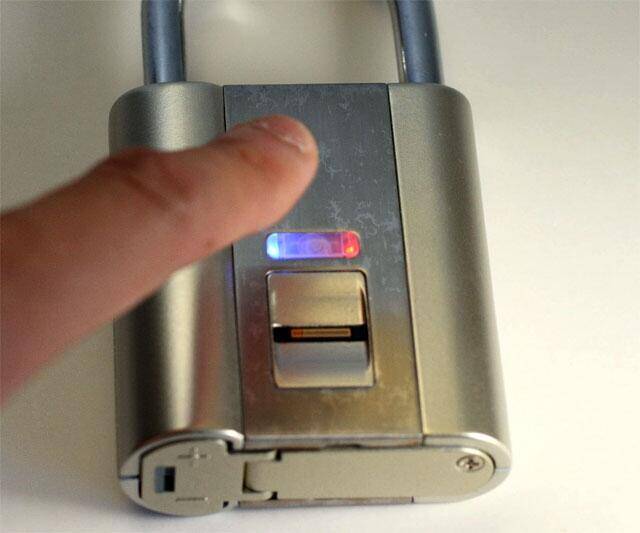
iFingerLock - Fingerprint Padlock | |||||||||||
| |||||||||||
Product Description
Our brand new product for 2014 is the worlds first Bluetooth Pad Lock, which uses your cellphone to unlock your padlock (no key needed!). You can also provide a temporary pin to someone even if you are not at the location of the lock. Here is some more info: No Key. No Problem. Keys have been used to open locks for centuries. But keys have the same problems today as they did back then. They are easy to lose, they can be stolen, they are a pain to share, and if you share them, you must get them back. Sharing combinations has its own set of issues. The Bluetooth Padlock was created to put those problems behind us. By using the bluetooth padlock and your smartphone, you'll always have easy access to all the important things in your life. In addition, you'll be able to share access to your possessions easily, safely, and securely. How it Works The Bluetooth Padlock was designed to be the simplest electronic device you own. Once you've donwloaded our iOS or Android app, Noke automatically finds and pairs to your Bluetooth 4.0 enabled smartphone. Attractive The bluetooth padlock is designed to look as good as it functions. The compact size allows the padlock to be used anywhere you'd use a traditional padlock. Strong While the padlock is an incredibly attractive device, it is designed to be strong. Using hardened steel and boron, the bluetooth padlock will stand up to the toughest environments. Water Resistant The bluetooth packlock is designed to work in places where it may get wet. Long-Lasting Battery The bluetooth padlock is packed with a long-life battery that will last over a year of normal use. If you need to replace the battery, it can be easily done without the use of any tools. Sharing Using our iOS or Android app, the bluetooth padlock allows instant and secure remote sharing. You can choose permanent, one-time, or custom settings. Need to give Johny access to your locker while you're on vacation? With our bluetooth padlock, it's no problem.Features
- Bluetooth
- Strong
- Water Resistant

Top Reviews
Unbelievably unreliableby Brian Harrison (1 out of 5 stars)
January 4, 2015
The lock stopped working about an hour after I first used it, losing the ability to program an administrator fingerprint. The lock was intended as a gift for a friend. I had tested programming it twice with my fingerprint. When I cleared the memory for the second time and went to help him program his own fingerprint, that's when the lock stopped working. There's a "setup" button which, when pressed, is supposed to put turn the status light blue and put the lock into fingerprint-learning mode. The status light no longer turns blue, and the lock no longer appears able to learn a fingerprint.
Obviously, I don't recommend this product, but if you decide to try your luck anyway, realize that even when the lock works, the fingerprint recognition is very finicky compared to the iPhone 6. There's no causal touch-and-unlock experience like you get with the iPhone. You have to put your finger just so, applying just the right amount of pressure, and swipe it down at just the right speed. A full 8-1/2 x 11 page is devoted to the swipe technique you need to use.
The instructions that come with the product are written in the type of mangled English that you still sometimes see in Chinese-made products. It's surprising to see them in a "high-tech" product that costs a hundred dollars.
Not worth extra price
by Deano9 (1 out of 5 stars)
December 2, 2013
Doesn't work very well, hard to program and takes several attempts to unlock - back to the drawing board - you have to drag your finger through it and that is a poor design -
Five Stars
by DR. HASAN KABIR (5 out of 5 stars)
April 17, 2015
GOOD AT ALL FATA FATI
What a piece of junk. I bought two of ...
by fengolly (1 out of 5 stars)
April 2, 2015
What a piece of junk. I bought two of these, one for me, one for a friend -- both broke almost immediately. $200+ down the drain.
Solid, convenient, and as slick as some great euphemism
by Jim Carnicelli (5 out of 5 stars)
July 4, 2014
**** Update 1/29/2015 ****
Six months of use have convinced me this is a good product. Innovative devices like this are often shabby; not much more than prototypes. I was very surprised I hadn't had to replace the batteries I originally put in, too.
I had a malfunction with the unit. A tiny nut came loose and the electronics were no longer working reliably. I contacted the vendor and they were happy to give me a replacement. I transferred the same batteries to the new one and in a few minutes had it trained on three of my fingers. Good to go again.
Note that vandals could easily steal the batteries; there's no special protection for the compartment. Also, they could run dry out at any point. So I keep an extra pair in my car, along with the electronic master key. And I keep my car key in my pocket instead of in the locker. I'd rather not have a bolt cutter be the only way I recover my lock and items. Think about your fallback plan. I was lucky my malfunction happened when it was not on a locker.
This lock still deserves five stars for being a good and innovative product.
**** From 7/4/2014 ****
This has "wow" factor. It's a great geek toy. But honestly, this is actually practical to me, too. I work out at the YMCA several times a week. I don't want to carry a key or remember a combination for a typical padlock. It is fairly big, to be sure, but it just barely fits the Y's lockers. And all I have to do is tap a button and swipe my thumb on the sensor to open it, a one-handed operation. You don't need to do anything to lock it except close it like any other padlock. Note that my sweaty, dirty hands don't seem to confuse the sensor after a workout.
The complex feature set means you need to learn how to use it. Read about setup before you try it because you'll be needlessly frustrated if you don't. Here's my own summary.
With a small phillips screwdriver, open the panel on the bottom. There is a USB key fob that plugs in here. This is an emergency unlock key, an awesome feature. I keep mine in my car and keep my car key on me in case there's ever a problem with the sensor. Just plug it in and it unlocks.
The key fob is also a master reset. Once plugged in, press the tiny "learn" button next to it. All fingerprints are cleared. The first one to be learned will be the "admin" user.
Here's the part that confuses a lot of people. Each time you want to add another fingerprint -- I'd recommend you do at least two of your own fingers, BTW -- you need to tap the "learn" button and then "log in" using the admin fingerprint. You don't need (or want) the key fob for this part. But logically, you would not want just anyone with a phillips screwdriver to be able to add his/her own fingerprint, right? That's why there is an admin login first.
Learning a new fingerprint can be a bit confusing and quirky. Read the instructions for the exact sequence of button presses, LED colors, and beeps. The main point is that you want to swipe several times, pressing fairly lightly (mashing the sensor makes the read worse). Each swipe should take 1/2 to 1 second. Each time you want to swipe at a slightly different angle. Hopefully you'll get around 5 good swipes and it will learn all of them for that finger. If you did it right, it should consistently recognize your finger on the first try most times.
I mainly use my thumb, which seems the most logical option for quickly unlocking and then handling the lock with one hand.
There's no way to remove a single fingerprint, as far as I know. Be prepared to cry as you use the key fob and "learn" button to clear them all out and start over. I have added one other person to my padlock because we work out together. She was goofing off a bit when she first taught the lock and it had a hard time afterward recognizing her fingerprint, so I cleared it and we started over after a few weeks.
One thing I like about this is that it is understated. It doesn't scream, "hey, kids! I'm a fun toy! Press my buttons over and over again to drain my batteries!" It looks boring and functional. I have yet to replace the two AAA batteries after months of very regular use.
Three Stars
by Leah (3 out of 5 stars)
July 17, 2015
It works with my print well however it has a hard time picking up my coworkers print.
Five Stars
by SB (5 out of 5 stars)
January 22, 2015
I'm very happy with this lock. Great product.
I love it
by Sean Liu (5 out of 5 stars)
December 20, 2013
This is a very cool and fancy lock, very easy to use. I hate to carry keys and always forget code. This lock solved my problem while I go to gym and I am very happy with it. It works on all my fingers at the same time so that I don't even need to remember while finger I used to set up. Great product, also great service as I contact with the seller. I got very nice instruction on how to use it. Based on my experience, it is important to slide your finger firmly against the scanner to make sure you fingerprint makes firm contact with the sensor while dragging.
Three Stars
by Trois (3 out of 5 stars)
March 16, 2015
Good idea but too big for the gym.
*If this is not the "iFingerLock - Fingerprint Padlock" product you were looking for, you can check the other results by clicking this link
 .
Details were last updated on Aug 20, 2026 03:36 +08.
.
Details were last updated on Aug 20, 2026 03:36 +08.